Compared
RoCode vs SuperbulletAI
SuperbulletAI, sometimes written Superbullet AI, here means the Roblox AI game builder at superbullet.ai, made by Superbullet Studios. Neither tool is made by Roblox. The short answer: SuperbulletAI is a desktop app that keeps your game as a Rojo project on your computer, syncs it into Studio and can pull in ready-made systems from its own library. RoCode is a Creator Store plugin plus a web chat that works one feature at a time in the Studio place you already have open.
Checked against SuperbulletAI’s own website, docs, terms and DevForum posts on 9 October 2026. RoCode wrote this page, so we are a competitor: every SuperbulletAI fact below comes from its own pages, listed under Sources, and anything they don’t say is marked as not stated. If something has changed, tell us in the Discord (opens in a new tab) and we will correct it.
How RoCode connects
Nothing to install on the computer beyond the plugin. Studio pairs with the chat using an 8-character code, then reconnects on its own.
How SuperbulletAI connects
SuperbulletAI runs as a desktop app on Windows or macOS. It installs a local Studio plugin, and you connect Rojo in the app and in Studio. Your project lives as files in a folder on your computer.
| Feature | RoCode | SuperbulletAI |
|---|---|---|
| What you install and where it runs | A free plugin from the Roblox Creator Store, in Roblox Studio on Windows or Mac. The chat runs in a desktop browser. Phones aren’t supported. | A desktop app for Windows 10 or 11 or macOS 12 and later (64-bit, 8 GB of RAM); its downloads page lists 250 MB. The app installs a local Studio plugin. No mobile version today. |
| How it reaches Studio | You pair Studio with the chat using an 8-character code. After that the plugin reconnects on its own and carries out each step in the open place. | Through Rojo. You press Connect Rojo in the app and Connect in its Studio plugin, and Rojo syncs a project folder on your computer into Studio. |
| Works on the place you already have open | Yes. It reads the objects and scripts a step needs, then creates and edits them in place. | Through an import. Its changelog added importing an existing Roblox project in September 2025, and in January 2026 automatic syncing of scripts that were not yet synced; the project then lives as Rojo files. Its public docs don’t give the import steps or say whether parts, models and UI come across. |
| Sign-in | Email code, Google, Roblox or Discord at rocode.app. | Email and password, or Google, according to its terms. |
| What it builds | Scripts, parts and UI, one feature at a time: 24 Studio tools, 12 ready-made structures built from parts, 6 UI layouts. | Game systems and UI in Luau, organised around its own modified version of the Knit framework, plus ready-made systems it retrieves from its own library, templates and marketplace. Its release notes also list animations, VFX and SFX; 3D generation is listed as planned. |
| Ask without changing anything | Yes. Ask mode answers questions about your place with read-only tools and changes nothing. | Its changelog lists an Ask Mode next to Agent Mode and Super Agent Mode (July 2025). Its public pages don’t say what Ask Mode can change. |
| Playtests its own work | No. RoCode compile-checks scripts in Studio and reads the Output of playtests you run, but does not run the game. | Its changelog added an “AI playtester” in February 2026, and its roadmap lists reading Studio’s error log. Its public pages don’t say what the playtester does. |
| Undo | Yes. Each batch of RoCode changes is marked as an undo point in Studio’s history. A longer run takes several presses of Ctrl+Z. | Checkpoints you can restore and redo, according to its roadmap and changelog. Your files are on disk, so you can also keep them in git. |
| Models | DeepSeek V4 Flash and GPT-OSS 120B on every plan. GLM 5.3 and Claude Sonnet 5.5 on Pro, Claude Opus 5.5 on Studio and up, GPT-6 Astra on Ultra and up. Or your own OpenRouter key on paid plans. | Current list not published. Its changelog names Claude Opus versions and DeepSeek. Its own model, BulletMindV1, is on its roadmap for Q1 2027. |
| Free tier | Starter: 3 credits a day on DeepSeek V4 Flash or GPT-OSS 120B, no card. | 1M tokens a month with a 150K daily limit. Its changelog says that since 31 August 2026 free credits are “used up 3x faster”. |
| Price | Published: Pro $9.99 a month, Studio $24.99, Ultra $49.99, Max $99.99, in US dollars before tax. | Published: Pro $20 a month for 11M tokens, or $192 a year for 120 million. Top-ups at $2 per 1M tokens. Teams at $40 a month is marked Coming Soon. |
| Unused allowance | Plan credits don’t carry over to the next month. Credit packs never expire. | Pro monthly tokens roll over. Annual and top-up tokens never expire. |
| Refunds | In full within 14 days of any payment, including renewals and credit packs. | None. Its terms say all purchases are final and non-refundable. Tebex is the merchant of record. |
In practice
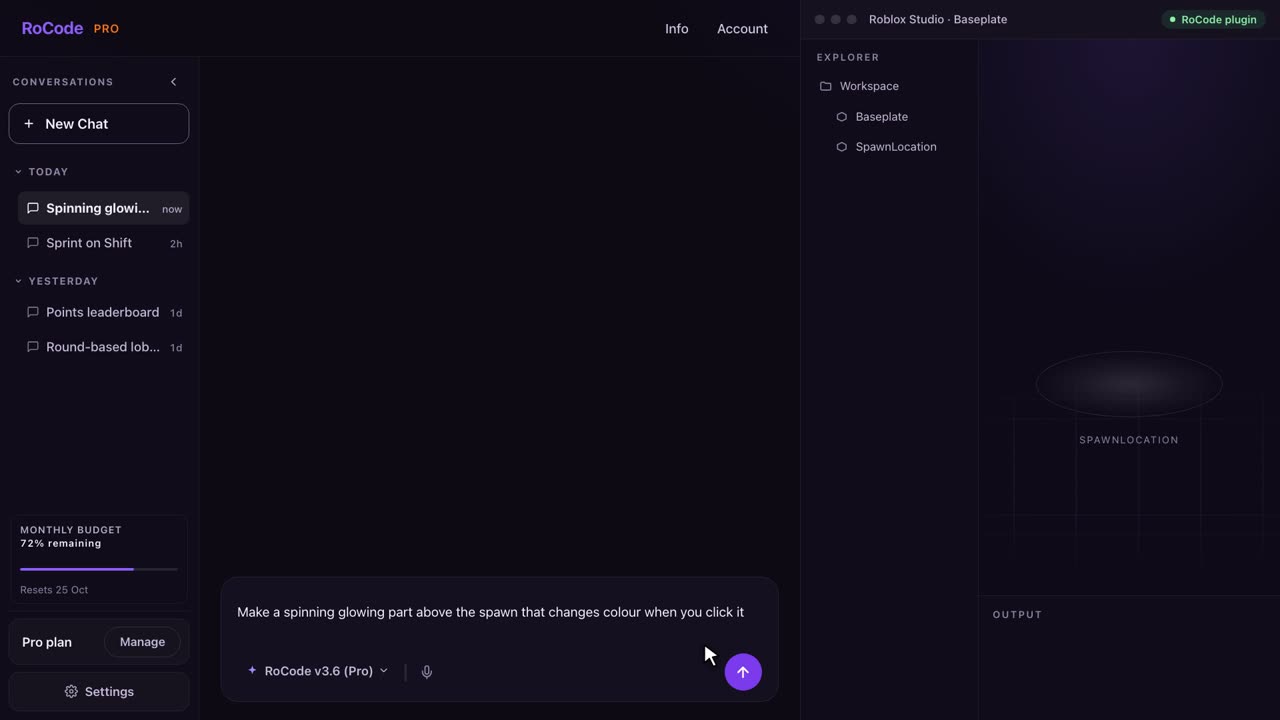
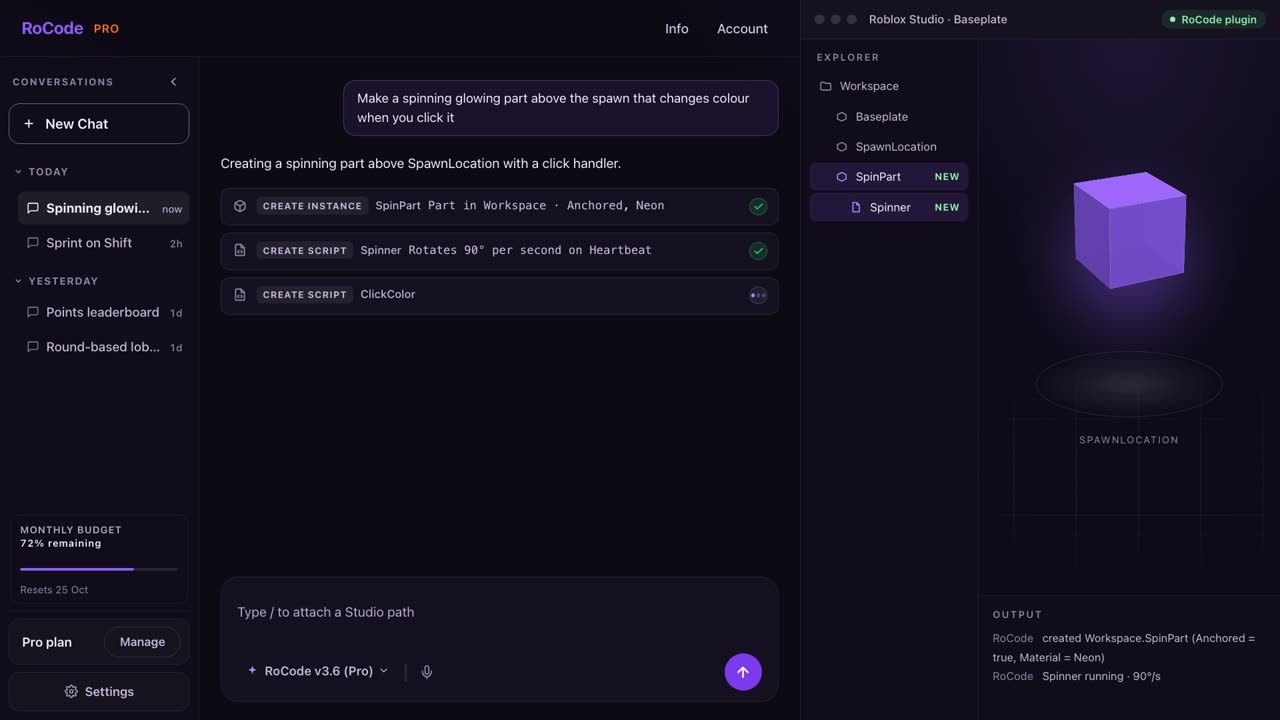
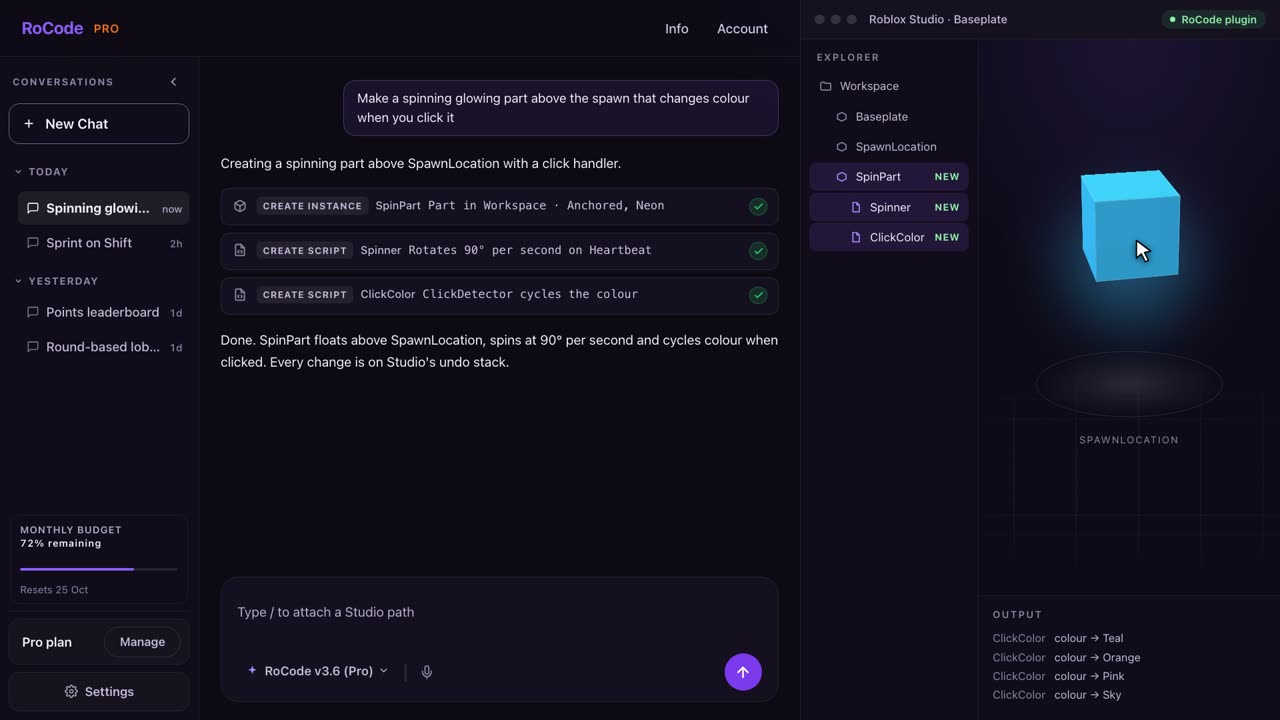
What a RoCode run looks like
Where SuperbulletAI is stronger
- A library of ready-made systems. It retrieves human-written systems, such as inventory, shop, currency and trading systems, into your project, and offers game templates and a marketplace. RoCode writes the Luau for each feature in your place; its ready-made pieces are 12 structures built from parts and 6 UI layouts.
- Your project as files. It lives in a Rojo folder you can keep in git, and its changelog lists GitHub repository creation when you publish. RoCode works inside the open place and does not publish or save it.
- Whole-project tools listed in its changelog and roadmap: codebase indexing on Pro, an integrated code editor, Luau LSP, file search, grep, web search, subagents and a planner. RoCode reads what each step needs through its 24 Studio tools.
- Allowance that carries over. Pro monthly tokens roll over, and annual and top-up tokens never expire. RoCode’s plan credits don’t carry over; only its credit packs never expire.
- A longer feature list beyond scripts and UI: its release notes name animations, VFX and SFX, and its changelog lists an AI playtester. RoCode does not generate meshes or animations and does not start playtests.
- A large DevForum presence: its launch thread had more than 111,000 views when we read it on 9 October 2026.
Where RoCode is stronger
- No desktop app, no Rojo and no import. You add a plugin from the Creator Store and work in the place you already have open. SuperbulletAI needs its desktop app, a local plugin and a Rojo connection, and works on an existing game through its import feature.
- A refund window. Any RoCode payment can be refunded in full within 14 days. SuperbulletAI’s terms say all purchases are final and non-refundable.
- A lower starting price: RoCode Pro is $9.99 a month, SuperbulletAI Pro is $20. They meter differently, credits against tokens, so compare them on your own tasks.
- A published model list by plan: DeepSeek V4 Flash and GPT-OSS 120B free, GLM 5.3 and Claude Sonnet 5.5 on Pro, Claude Opus 5.5 from Studio, GPT-6 Astra from Ultra, or your own OpenRouter key on paid plans. SuperbulletAI doesn’t publish its current list.
- Changes you can follow in Studio. Every step shows in the chat with the path it touched, the scripts it writes are compile-checked inside Studio, and each batch of changes is an undo point in Studio’s own history.
- More ways to sign in: email code, Google, Roblox or Discord.
Pricing
What each one costs
RoCode
$9.99a month for Pro, or free every day
- Free plan: 3 credits a day, no card, on DeepSeek V4 Flash or GPT-OSS 120B. That is enough for a few small tasks a day.
- Pro $9.99 a month (150 credits), Studio $24.99 (400), Ultra $49.99 (900), Max $99.99 (2,000). Billed yearly, each plan costs 30% less with the same credits.
- A credit measures what a run costs to compute. Stronger models and longer runs use more. At current rates a task on GLM 5.3 uses about 4 credits; long tasks use more.
- Credit packs from 50 credits for $4.99 up to 800 credits for $54.99, for paid plans. They never expire.
- Your own OpenRouter key and a tool-calling model you choose on any paid plan, billed by OpenRouter, not by RoCode.
- Any payment can be refunded in full within 14 days. Paddle is the merchant of record.
SuperbulletAI
$20a month for Pro, or 1M free tokens a month
- Free plan: 1M tokens a month with a 150K daily limit. Its changelog says free credits are used up 3x faster since 31 August 2026.
- Pro $20 a month for 11M tokens, with no daily limit and codebase indexing; unused tokens roll over. Annual Pro is $192 a year for 120 million tokens upfront.
- Teams is listed at $40 a month for 22M tokens but marked Coming Soon. Enterprise is priced on request.
- Top-ups cost $2 per 1M tokens, from $20 for 10M up to $800 for 400M, and never expire.
- Its pricing page doesn’t say what a token covers, or whether different models use tokens at different rates.
- All purchases are final and non-refundable under its terms. Tebex is the merchant of record.
Which one
Which should you pick?
Pick SuperbulletAI if you are happy to run a desktop app, want your game as Rojo files you can keep in git, and want ready-made systems and templates pulled into your project. Try its free plan first and read its terms before you pay: all purchases are non-refundable.
Pick RoCode if you already have a place open in Roblox Studio and want an agent to add or fix features inside it, one at a time, with nothing to install beyond a Creator Store plugin. Its scripts are compile-checked in Studio and each batch of changes is on Studio’s undo history. You can read its plans and prices and use the free 3 credits a day before paying anything, and any payment can be refunded within 14 days.
FAQ
Questions
Is RoCode a SuperbulletAI alternative?
Yes, if you build in Roblox Studio and would rather not install a desktop app or set up Rojo. RoCode is a free plugin from the Roblox Creator Store plus a web chat: you describe a feature, and it writes the Luau and builds it in the place you have open. SuperbulletAI is a desktop app for Windows and macOS that works on a Rojo project on your computer and can add ready-made systems from its own library.
How much does SuperbulletAI cost compared with RoCode?
On 9 October 2026 SuperbulletAI listed a free plan with 1M tokens a month and a 150K daily limit, Pro at $20 a month for 11M tokens, and top-ups at $2 per 1M tokens, with no refunds. RoCode’s Starter plan is free with 3 credits a day, Pro is $9.99 a month for 150 credits, and any payment can be refunded in full within 14 days. Tokens and credits are different units, so compare them on your own tasks.
Does SuperbulletAI need Rojo or a download?
Yes. SuperbulletAI is a desktop app, and its downloads page lists Windows 10 or 11 or macOS 12 and later, 64-bit, with 8 GB of RAM. The app installs a local Roblox Studio plugin and connects to Studio through Rojo, which syncs a project folder on your computer into Studio. RoCode needs only its plugin from the Creator Store and a desktop browser.
Is SuperbulletAI safe to install?
We can’t vouch for another company’s software, so here is what its own pages say. Its Windows install guide tells you to let SmartScreen run the installer (More info, then Run anyway), and its FAQ says it has not yet bought a Microsoft code signing certificate. On macOS, its developer says the app is notarised by Apple, and the install guide says it may ask for Accessibility permission for script automation. Its terms say that by using the service you consent to collection of your hardware ID (HWID). Read those pages before you install.
Which AI models does SuperbulletAI use?
Its current model list is not on its public pages. Its changelog names Claude Opus versions and DeepSeek, and in February 2026 its developer wrote on the DevForum that it has no AI model of its own yet, only service providers. Its own model, BulletMindV1, is on its roadmap for Q1 2027, although its FAQ still says it runs on BulletMindV1. RoCode has no model of its own either: depending on your plan, it runs DeepSeek V4 Flash, GPT-OSS 120B, GLM 5.3, Claude Sonnet 5.5, Claude Opus 5.5 or GPT-6 Astra through OpenRouter.
Does RoCode playtest or build a whole game from one prompt?
No. RoCode works one feature at a time in the place you have open. It compile-checks the scripts it writes inside Studio and reads the Output of playtests you run, but it does not start playtests or build a finished game from one sentence. SuperbulletAI’s changelog lists an AI playtester, but its public pages don’t say what it does.
Sources
- superbullet.ai (opens in a new tab) home page, read 9 October 2026, for what it describes itself as, the Superbullet Studios name and the BulletMindV1 status.
- superbullet.ai/pricing (opens in a new tab), read 9 October 2026, for plans, token allowances, the free daily limit and rollover.
- superbullet.ai/token-topups (opens in a new tab), read 9 October 2026, for top-up prices and expiry.
- superbullet.ai/downloads (opens in a new tab), read 9 October 2026, for system requirements, download size and the changelog: Rojo, project import, Ask Mode, the AI playtester, models, checkpoints and free credit use.
- superbullet.ai/install-guide (opens in a new tab), read 9 October 2026, for the SmartScreen and macOS install steps.
- superbullet.ai/faq (opens in a new tab), read 9 October 2026, for why it is a desktop app, the code signing certificate and the BulletMindV1 statement.
- superbullet.ai/roadmap (opens in a new tab), read 9 October 2026, for checkpoints, error log reading, 3D plans, the BulletMindV1 date and mobile plans.
- superbullet.ai/terms-of-service (opens in a new tab) (last updated 18 April 2026), read 9 October 2026, for sign-in, refunds, Tebex and the hardware ID.
- docs.superbulletstudios.com/installation (opens in a new tab), read 9 October 2026, for the local plugin and the Rojo steps. That page still says there is no macOS support, which its downloads page and changelog contradict.
- docs.superbulletstudios.com/version-control (opens in a new tab), read 9 October 2026, for where project files live and using git.
- SuperbulletAI docs, project structure page (opens in a new tab), read 9 October 2026, for its project layout and its modified Knit framework.
- SuperbulletAI launch thread on the Roblox DevForum (opens in a new tab), read 9 October 2026, for the view count, the template retrieval framework and its developer’s posts on models and macOS notarisation.
- Roblox Creator Hub, external tools (opens in a new tab), read 9 October 2026, for how Rojo syncs files on your computer with Studio through a plugin.
RoCode facts come from RoCode’s own site, plugin and relay code, rechecked on 9 October 2026; setup steps are in the RoCode docs. Also weighing Lemonade? See RoCode vs Lemonade, or the full Roblox AI tools comparison.
Try RoCode on your own place.
Free every day, no card required. Install the plugin, describe the feature, and see what lands in Studio.
No card required. Get the Studio plugin (opens in a new tab)