Compared
RoCode vs JellyBuild
The short answer
JellyBuild is a web app with a free Roblox Studio plugin: you describe a script, system or map on its site and the plugin applies the result in Studio. Its free Starter plan gives 10 credits a day, a script generation costs 5 to 15 credits, and paid plans are Dev $7.99, Creator $14.99 and Studio $29.99 a month; maps (Builder Mode) need Creator or Studio. RoCode is a web chat plus a free Studio plugin that reads and edits the place you have open, gives 1 free credit a day, Pro is $9.99 a month, and any payment can be refunded in full within 14 days.
Checked 12 November 2026 against jellybuild.com, its pricing, FAQ, info, Studio plugin, Builder Mode and terms pages.
JellyBuild here means the AI Roblox game maker at jellybuild.com. Both tools pair a website with a free Roblox Studio plugin. JellyBuild generates a project on its site and sends it to Studio; RoCode is an agent that works inside the place you have open. The other differences are the free allowance, which plan builds maps, price and refunds.
Checked on 12 November 2026 against the JellyBuild home page, its pricing page, FAQ, key facts page, Studio plugin page, Builder Mode page, about page and terms. We did not install its plugin or buy a plan, so anything those pages don't say is marked as not stated. If something has changed, tell us in the Discord (opens in a new tab) and we will correct it.
| Feature | RoCode | JellyBuild |
|---|---|---|
| What you install and where it runs | A free plugin from the Roblox Creator Store, in Roblox Studio on Windows or Mac. The chat runs at rocode.app in a desktop browser. Studio connects by itself when it is signed in to the same Roblox account (plugin 3.9.13 or newer), otherwise with a one-time 8-character code. | A web app at jellybuild.com plus a free plugin from the Roblox Creator Store. You click Connect to Website in the plugin, open the link it shows, sign in and approve; the link expires after 10 minutes. Its FAQ says HTTP requests must be enabled in your game settings. Its pages do not list supported operating systems. |
| Sign-in | Email code, Google, Discord or Roblox at rocode.app, with no RoCode password. | Roblox account through Roblox's own OAuth, or a free Starter account, per its about page. It does not ask for your Roblox password. |
| Works on the place you already have open | Yes. It reads the objects and scripts a step needs, then creates and edits them in the place you have open. | It applies what you generate on the website into Studio: scripts, RemoteEvents, UI, folders, parts and models, each in the right service. Follow-up prompts build on the same JellyBuild project. Its pages do not say the plugin reads scripts or objects that were already in your place. |
| What it builds | Scripts, parts and UI, one feature or one round of a game at a time, with 27 Studio tools. Ready-made UI kits: 25 screens (HUD, pet inventory, store, daily rewards, item shop, egg hatching, rebirth, main menu, battle pass, shooter HUD and more) in 5 themes, animated, with working server scripts, inserted in one step. Themed world islands (volcano, desert canyon, jungle or snow) in one call. | Three modes. Scripts: Luau scripts, RemoteEvents, UI and game systems such as shops, round systems and admin commands, on every plan. Builder Mode: maps, terrain zones, model layouts and lighting, on Creator and Studio only. Talk: Roblox questions and advice, on every plan. |
| Review and undo | It builds as soon as you send. Each batch of changes is an undo point in Studio's own history, so Ctrl+Z takes it back. | You can review each project before applying it, or turn on Auto Apply. Its pages do not mention undo; its terms tell you to back up your place and test in a draft place first. |
| Playtests its own work | Yes, within limits. After a build its test robot can play the game in Studio: it walks, touches parts, clicks buttons, presses keys and equips tools, then reports each check as PASS or FAIL (plugin 3.9.11 or newer; keys and clicks need 3.9.15 or newer). The agent decides when to test, and it cannot tell you whether the game is fun. | Not stated. Its plans list "auto-repair" passes (1 on Starter and Dev, up to 2 on Creator, up to 3 on Studio), and its Advanced Thinking and Ultra Thinking modes add validation passes. Its pages do not say it runs the game. |
| Models | GPT-6 Luna on every plan. GLM 5.3 Flash and Claude Sonnet 5.5 from Pro, Claude Opus 5.5 from Studio, GPT-6 Astra on Ultra. Any paid plan can also run your own OpenRouter key. | Not named: its key facts page says every AI feature is branded JellyBuild AI. You pick a mode instead: Fast and Standard on every plan, Advanced Thinking from Dev, Ultra Thinking from Creator. Creator and Studio list a "higher-quality AI model". |
| Free tier | 1 credit a day, refilled at 00:00 UTC, no card. A standard task on GPT-6 Luna uses about 0.4 credits. | Starter: 10 credits a day, no card, reset every 24 hours and not stacked. Chat is free, a simple fix costs 1 credit and a script or system generation 5 to 15. No Builder Mode. |
| Price | Pro $9.99 a month (150 credits), Studio $19.99 (320), Ultra $29.99 (500). Credit packs from $4.99 on any plan. | Dev $7.99 a month (100 credits a day), Creator $14.99 (300 a day), Studio $29.99 (800 a day). Credit packs from $2.99 for 20 credits to $19.99 for 360, never expiring. |
| Refunds | In full within 14 days of any payment, including renewals and credit packs. | Not stated. Its terms (last updated 8 May 2026) and pricing page do not mention refunds. |
In practice
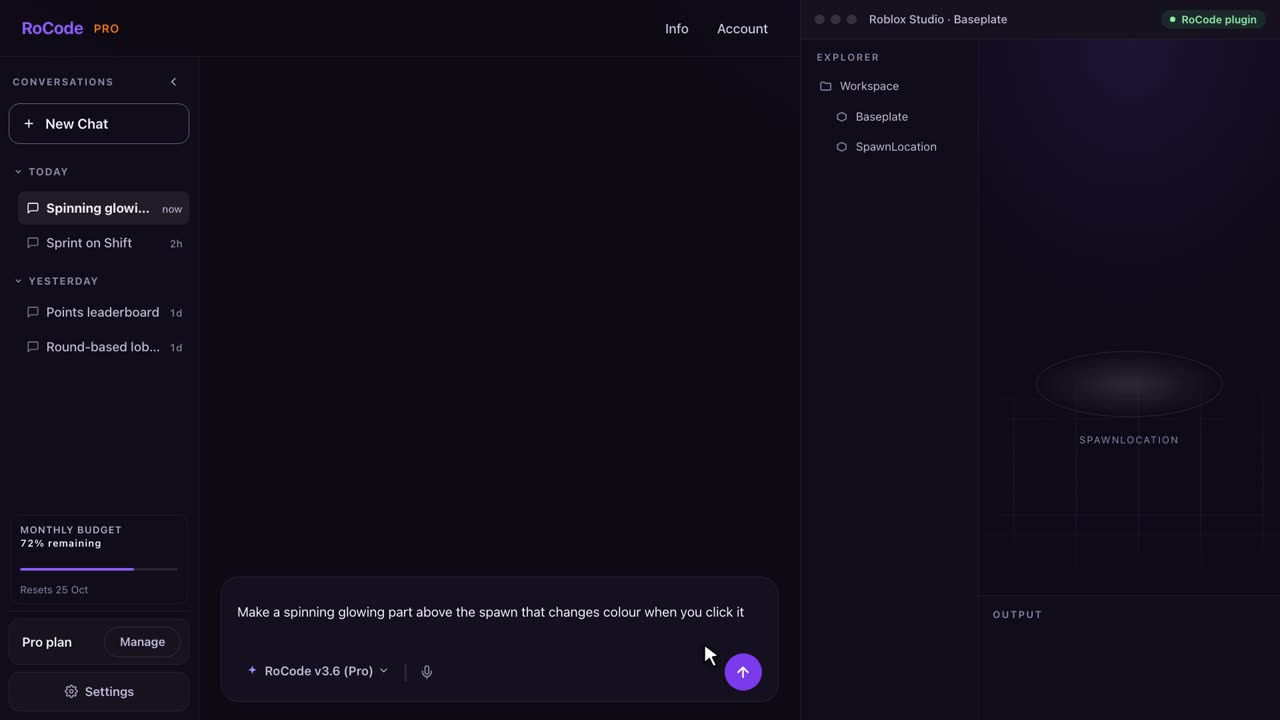
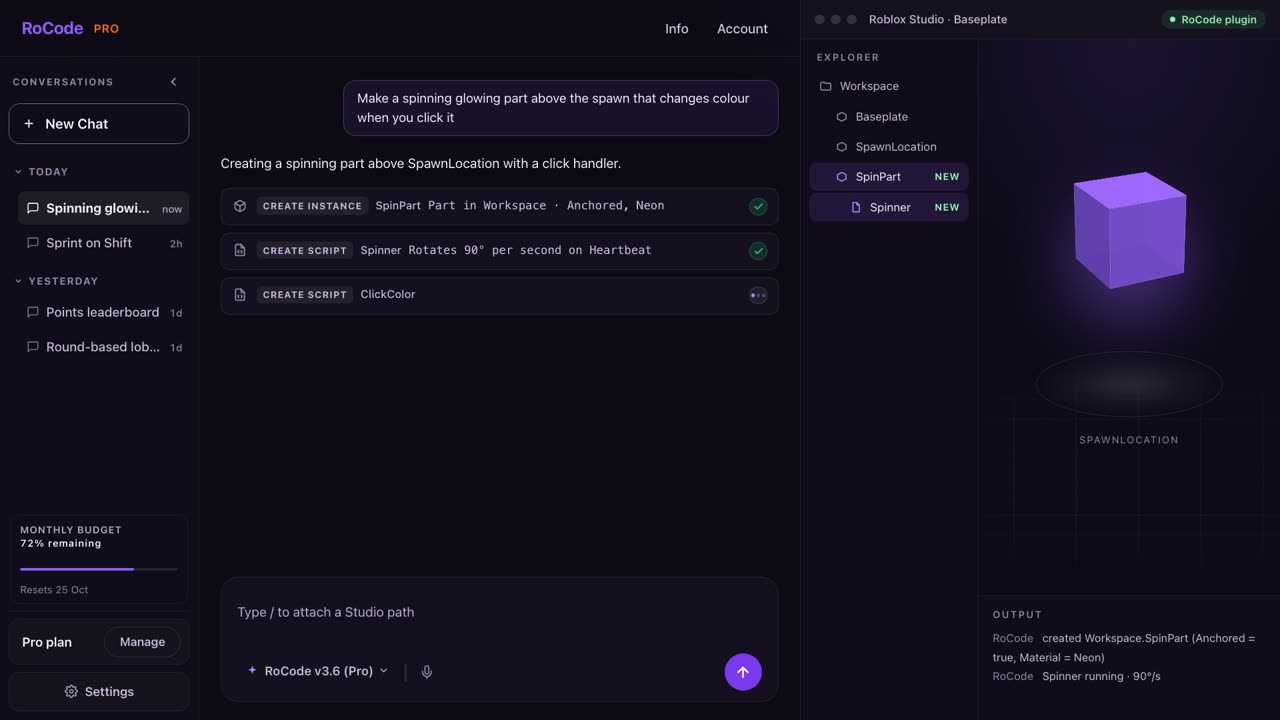
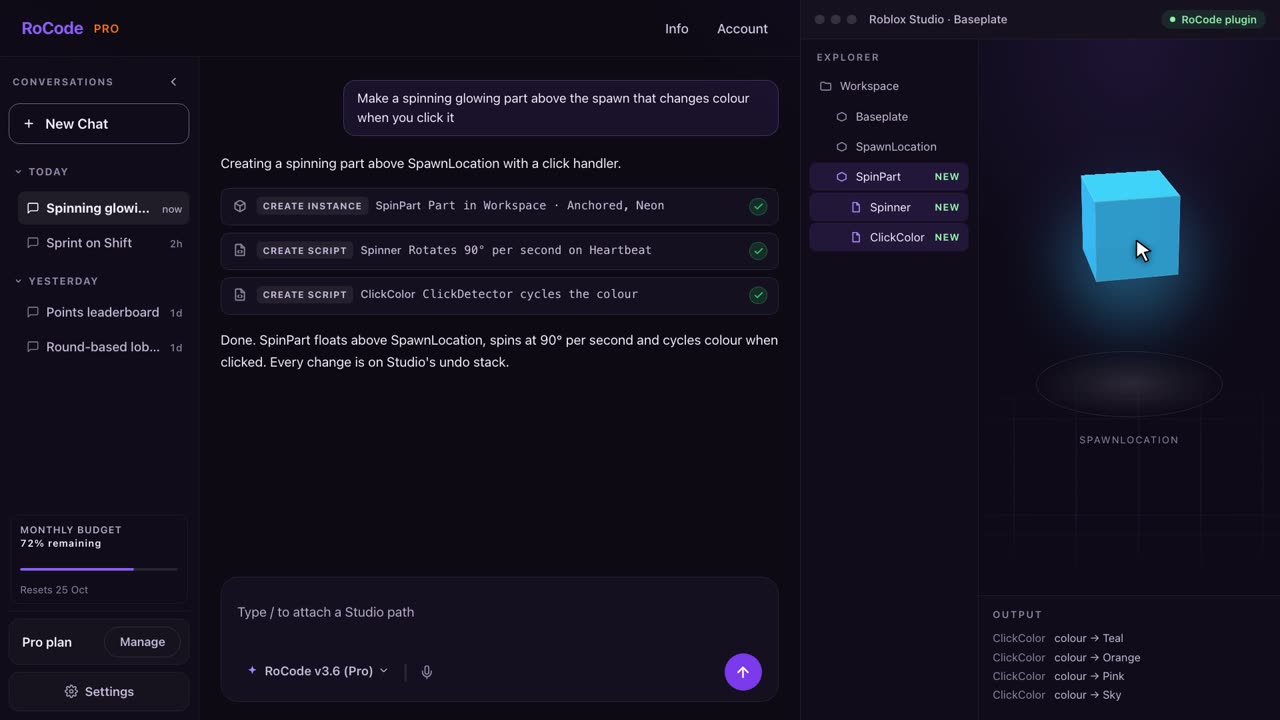
What a RoCode run looks like
Where JellyBuild is stronger
- A lower first paid plan: Dev is $7.99 a month, against $9.99 for RoCode Pro. Its smallest credit pack is $2.99, against $4.99.
- Questions cost nothing: its pricing page lists chat and Roblox Q&A as always free, on every plan.
- Credits that refill every day on paid plans too (100, 300 or 800 a day), and its pricing page says credits are only spent when a generation succeeds. RoCode's paid plans give a set number of credits a month.
- You can look over a generated project on the website before it touches Studio, with Auto Apply off. RoCode builds as soon as you send, and each batch is an undo point instead.
- 3D model generation: Creator and Studio include 5 and 15 Meshy AI model generations a month, with extra packs from $3.99 for 5. Its cost table marked HD 3D asset generation as coming soon on the day we checked. RoCode does not generate meshes or textures.
Where RoCode is stronger
- It works on the place you already have: RoCode reads the objects and scripts a step needs, then edits them. JellyBuild's pages describe applying projects made on its website, and do not say it reads what is already in your place.
- Undo. Each batch of RoCode changes is an undo point in Studio's own history. JellyBuild's pages do not mention undo, and its terms tell you to back up your place first.
- A test robot that can play the game in Studio after a build and report each check as PASS or FAIL. JellyBuild's pages do not say it runs the game.
- A stated refund window: in full within 14 days of any payment. JellyBuild's terms and pricing page do not mention refunds.
- Named models by plan, from GPT-6 Luna on every plan to Claude Opus 5.5 and GPT-6 Astra, or your own OpenRouter key. JellyBuild does not name its models.
- Parts and themed world islands are part of a normal RoCode run. JellyBuild's map generator, Builder Mode, is on Creator ($14.99 a month) and Studio only.
- Ready-made UI kits, 25 animated screens in 5 themes with working server scripts, each inserted in one step.
Pricing
What each one costs
RoCode
$9.99a month for Pro, or 1 free credit a day
- Free Starter plan: 1 credit a day, refilled at 00:00 UTC, on GPT-6 Luna, no card.
- Pro $9.99 a month (150 credits), Studio $19.99 (320), Ultra $29.99 (500), in US dollars before tax. Billed yearly, each plan costs 30% less with the same credits.
- A credit measures what a run costs to compute. An advanced task uses about 4 credits and a standard task on GPT-6 Luna about 0.4, at current rates. Long tasks use more.
- Credit packs from 50 credits for $4.99 up to 1,200 credits for $99.99 never expire, and you can buy them on any plan, the free one included.
- Any payment can be refunded in full within 14 days. Paddle is the seller on your receipt.
JellyBuild
$7.99a month for Dev, or 10 free credits a day
- Starter: free, 10 credits a day, no card. Daily credits reset every 24 hours and unused ones do not stack.
- Dev $7.99 a month (100 credits a day), Creator $14.99 (300 a day), Studio $29.99 (800 a day). Its pricing page showed monthly prices only.
- What a credit buys: chat and Q&A are free, a simple refine or fix is 1 credit, a script or system generation 5 to 15, and a Builder Mode map 10, 20 or 40 by size (Creator and Studio only).
- Credit packs: 20 for $2.99, 60 for $5.99, 140 for $9.99 and 360 for $19.99. They never expire, and paid plans get 25% more credits in each pack.
- 3D model generations are counted apart from credits: 5 a month on Creator, 15 on Studio, and packs from $3.99 for 5 up to $27.99 for 50.
- No refund policy on its pricing page or in its terms.
A credit is not the same unit in the two tools: JellyBuild prices each kind of request, while a RoCode credit follows what a run costs to compute. Compare what a day or a month lets you build, not the counts.
Which one
Which should you pick?
Pick JellyBuild if you want to generate a script or a system on a website, look it over and then send it to Studio, if you ask a lot of Roblox questions and want that part free, or if $7.99 a month is the budget.
Pick RoCode if you want an agent that reads and edits the place you already have open, with every batch of changes an undo point, a test robot that plays the game after a build, named models, ready-made UI kits and themed worlds, and a full refund within 14 days of any payment. See plans and prices.
FAQ
Questions
Is RoCode a JellyBuild alternative?
Yes. Both pair a website with a free Roblox Studio plugin, so nothing is pasted by hand. JellyBuild generates a project on its site and the plugin applies it. RoCode is an agent that reads and edits the place you have open, step by step, and marks each batch of changes as an undo point. RoCode's Starter plan is free with 1 credit a day and Pro is $9.99 a month.
Is JellyBuild free?
It has a free plan. On 12 November 2026 its pricing page listed Starter as free with 10 credits a day and no card, with chat and Roblox Q&A always free, a simple fix at 1 credit and a script or system generation at 5 to 15 credits. Daily credits do not stack. Builder Mode, its map generator, needs the Creator or Studio plan.
How much does JellyBuild cost compared with RoCode?
JellyBuild's pricing page listed Dev at $7.99 a month (100 credits a day), Creator at $14.99 (300 a day) and Studio at $29.99 (800 a day), with credit packs from $2.99 for 20 credits to $19.99 for 360. RoCode's Starter plan is free with 1 credit a day, Pro is $9.99 a month, Studio $19.99 and Ultra $29.99, with a full refund within 14 days of any payment. The two tools count credits differently, so the numbers do not compare one to one.
Does JellyBuild give refunds?
Its pages did not say when checked on 12 November 2026. The terms, last updated 8 May 2026, cover acceptable use, the Roblox account connection and liability, and do not mention refunds or billing. RoCode refunds any payment in full within 14 days.
Sources
- jellybuild.com (opens in a new tab) home and about pages, read 12 November 2026, for what it is, how it works and sign-in.
- jellybuild.com/pricing (opens in a new tab), read 12 November 2026, for plans, credit costs, credit packs and 3D model generations.
- jellybuild.com/faq (opens in a new tab) and jellybuild.com/jellybuild-info (opens in a new tab), read 12 November 2026, for modes, plan gates, the HTTP requests setting and how it names its AI.
- jellybuild.com/ai-roblox-studio-plugin (opens in a new tab) and jellybuild.com/builder-mode (opens in a new tab), read 12 November 2026, for the plugin, Auto Apply and Builder Mode.
- jellybuild.com/terms (opens in a new tab), read 12 November 2026, for backups, the Roblox account connection and the absence of refund terms.
RoCode facts come from RoCode's pricing page, docs and RoCode facts, checked 12 November 2026. RoCode wrote this page, so we are a competitor. See the full Roblox AI tools comparison.
Try RoCode on your own place.
Free every day, no card required. Install the plugin, describe the feature, and see what lands in Studio.
No card required. Get the Studio plugin (opens in a new tab)