Compared
RoCode vs Roblox Build
The short answer
Roblox Build is Roblox's own free AI game maker, in the Build tab of the Roblox mobile app. On 23 October 2026 its docs said it makes 2D and 2.5D games such as clickers and side-scrollers, gives free prompts every day, and was rolling out region by region, starting with New Zealand. RoCode is a separate AI agent for Roblox Studio on Windows or Mac: it builds 3D games, scripts, UI and worlds in the place you have open, with 1 free credit a day.
Checked 23 October 2026 against Roblox's Build docs and its July 2026 announcement.
Roblox Build here means Build, the AI game creation tab in the Roblox mobile app, documented at create.roblox.com/docs/ai/build. It is not Roblox Assistant, the AI built into Roblox Studio, which has its own comparison. The two tools aim at different people: Build is for making a simple game on a phone, RoCode is for building in Roblox Studio.
Checked on 23 October 2026 against Roblox's Creator Docs page "Create games with Build" (last updated 22 October 2026) and the Roblox newsroom post of 16 July 2026 that announced it. We could not open the Build tab, which had not reached our region, so anything those pages don't say is marked as not stated. If something has changed, tell us in the Discord (opens in a new tab) and we will correct it.
| Feature | RoCode | Roblox Build |
|---|---|---|
| Where it runs | Roblox Studio on Windows or Mac, with a free plugin from the Creator Store, and the chat at rocode.app in a desktop browser. Phones are not supported. | The Build tab in the Roblox mobile app. Its docs describe no computer setup. |
| Who can use it | Anyone 13 or older, the minimum age in RoCode's terms, with Roblox Studio on a computer. No regional rollout. | Users 9 and older who have completed an age check, in regions where Build has arrived. It was rolling out gradually, starting with New Zealand. |
| What it builds | Scripts, parts and UI, one feature or one round of a game at a time, with 27 Studio tools. Ready-made UI kits: 10 screens (HUD, pet inventory, store, daily rewards, item shop, egg hatching, rebirth, settings, daily quests, loading screen) in 5 themes, animated, with working server scripts, inserted in one step. Themed world islands (volcano, desert canyon, jungle or snow) in one call. | 2D and 2.5D games, best with simple types: clickers, arcade games, collect-and-score games, side-scrollers and puzzle games. Its docs say more genres and 3D are coming. |
| Works on a place you already have | Yes. It reads the objects and scripts a step needs, then creates and edits them in the place you have open. | No. Build makes its own games. Editing a Build game in Roblox Studio turns it into a standard Studio game and removes its Build status, which cannot be undone for that version. |
| Playtests | Yes, within limits. After a build its test robot can play the game in Studio: it walks, touches parts, clicks buttons, presses keys and equips tools, then reports each check as PASS or FAIL (plugin 3.9.11 or newer; keys and clicks need 3.9.15 or newer). The agent decides when to test, and it cannot tell you whether the game is fun. | Its docs say playtesting is coming soon and is not yet available in Build. Roblox's announcement lists a playtesting agent among planned tools. |
| Publishing | RoCode does not publish your game. You publish from Studio when you are ready. | One tap. The game runs a quick safety check and goes live on your profile. Build games are set for players 16 and older by default. |
| Free tier | 1 credit a day (2 on the day you sign up), refilled at 00:00 UTC, no card. After a few builds, free accounts are asked to join the RoCode Discord to keep getting free credits. | A set number of free prompts every day, reset daily. Every message counts as one prompt, follow-ups included. Its docs do not say how many. |
| Price | Pro $9.99 a month (150 credits), Studio $19.99 (320), Ultra $29.99 (500). Credit packs from $4.99 on any plan. | More credits are bought with Robux inside Build. Its docs give no price, and purchased credits do not expire. |
| Made by | RoCode.app, an independent product, not affiliated with Roblox. | Roblox Corporation. |
In practice
What a RoCode run looks like
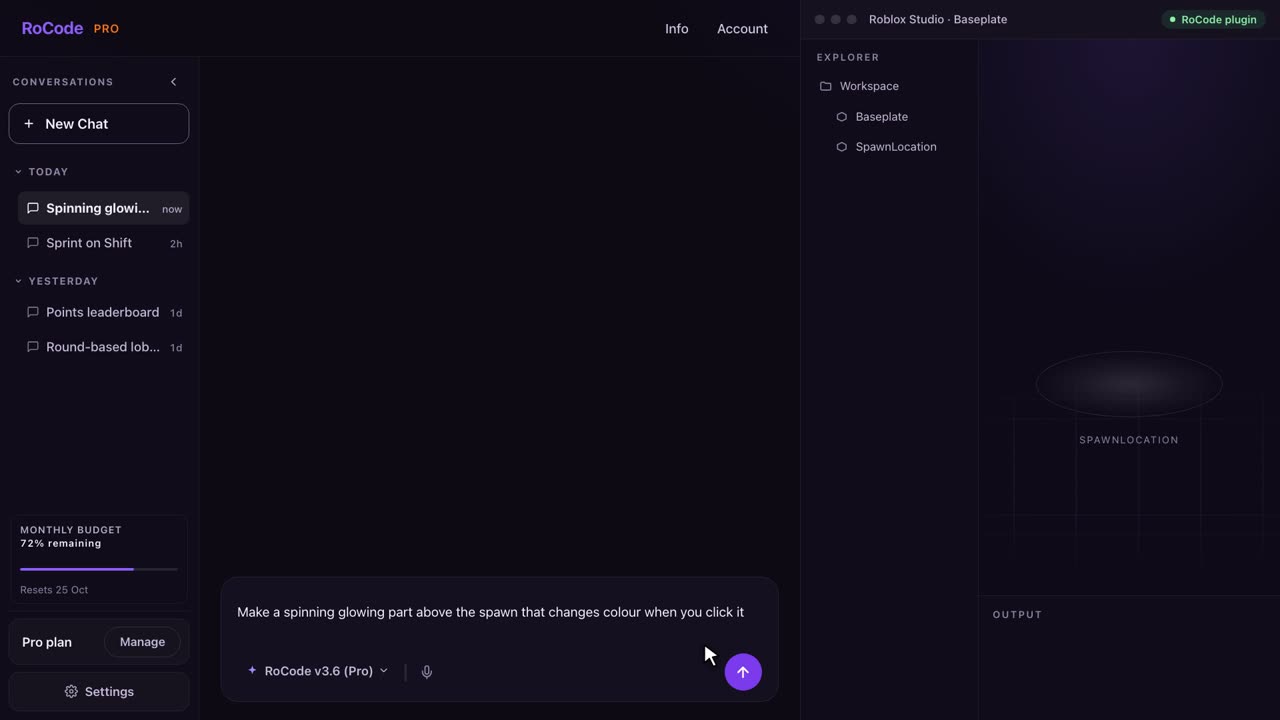
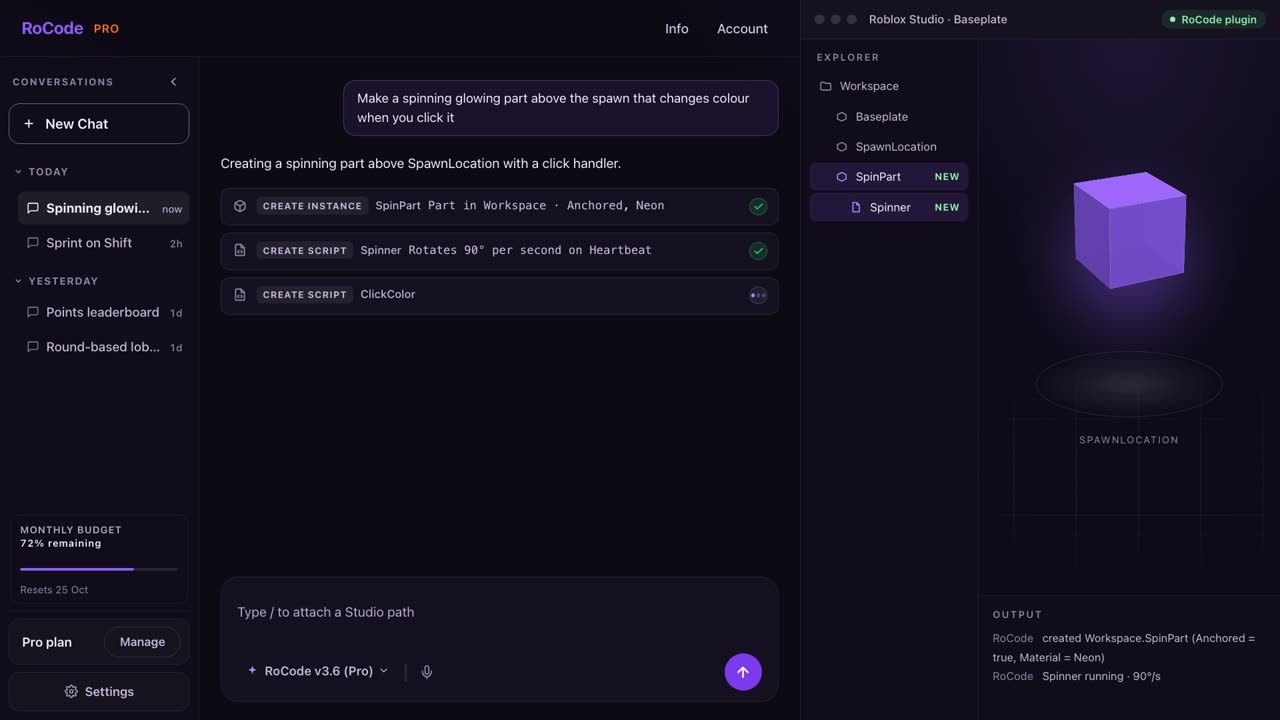
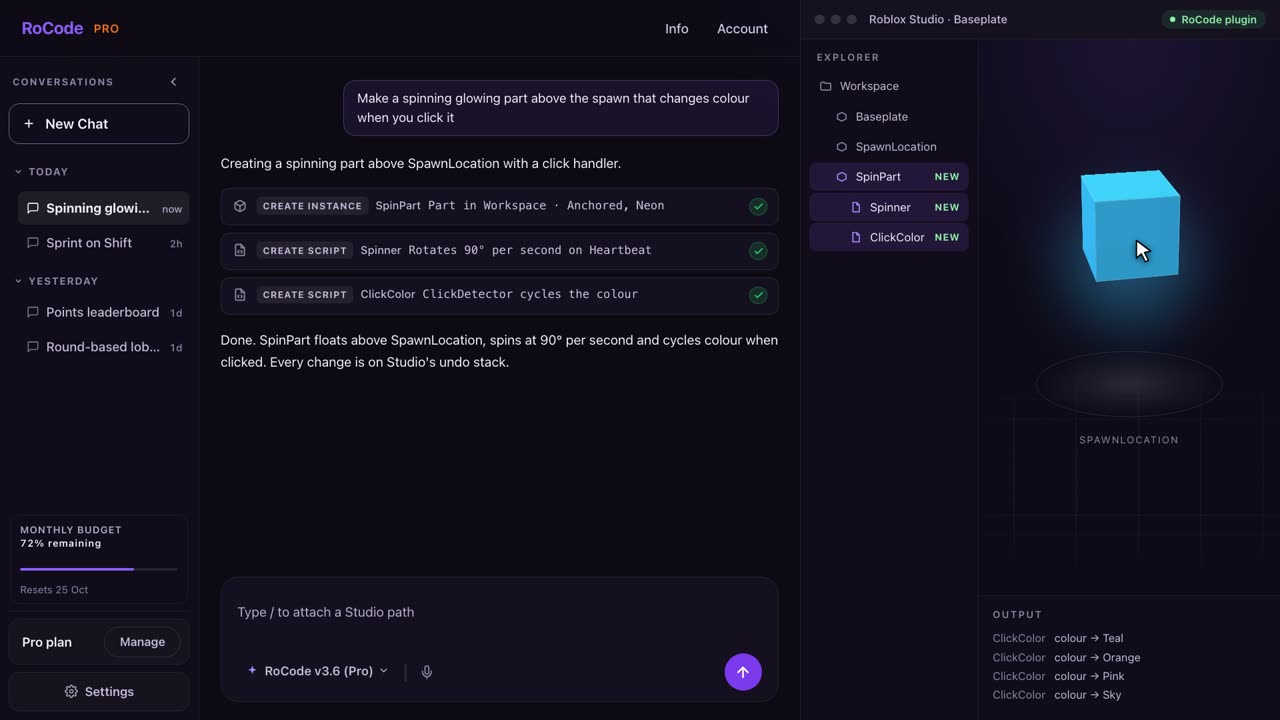
Where Roblox Build is stronger
- It is Roblox's own tool and has a free daily allowance of prompts, with more credits bought in Robux. Nothing to install and no second account.
- It works on a phone. RoCode needs Roblox Studio on a computer and a desktop browser.
- One-tap publishing. A Build game passes a safety check and goes live on your profile. RoCode builds in your place and leaves publishing to you.
- No game development knowledge at all. You describe a game and play it straight away.
Where RoCode is stronger
- 3D games in Roblox Studio. Build focuses on 2D and 2.5D games for now. RoCode builds in the full 3D place you have open, from maps and themed world islands to scripts and UI.
- It works on your existing game. Build games stay inside Build, and opening one in Studio removes its Build status for good. RoCode edits the place you already have.
- A test robot today. After a build it plays the game in Studio and reports each check as PASS or FAIL. Build's docs say its playtesting is coming soon.
- Ready-made game UI: 10 animated screens in 5 themes, with working server scripts, inserted in one step.
- No regional rollout. If Build has not reached your region yet, RoCode works in Roblox Studio now, for anyone 13 or older.
- Real Luau you can read and change. Every script RoCode writes is an ordinary script in your place.
Pricing
What each one costs
RoCode
$9.99a month for Pro, or 1 free credit a day
- Free Starter plan: 1 credit a day, 2 on the day you sign up and 2 on the day you join the RoCode Discord, refilled at 00:00 UTC, on DeepSeek V4 Flash, no card. After a few builds, free accounts are asked to join the RoCode Discord to keep getting free credits.
- Pro $9.99 a month (150 credits), Studio $19.99 (320), Ultra $29.99 (500), in US dollars before tax. Billed yearly, each plan costs 30% less with the same credits.
- A credit measures what a run costs to compute. An advanced task uses about 4 credits and a standard task on DeepSeek V4 Flash about 0.4, at current rates. Long tasks use more.
- Credit packs from 50 credits for $4.99 up to 1,200 credits for $99.99 never expire, and you can buy them on any plan, the free one included.
- Any payment can be refunded in full within 14 days. Paddle is the seller on your receipt.
Roblox Build
Freedaily prompts, more with Robux
- A set number of free prompts every day, reset daily. Its docs do not state the number.
- Every message counts as one prompt, including follow-up changes.
- More credits are bought with Robux inside Build. Purchased credits do not expire.
- If you run out while a game is generating, that generation finishes first.
Which one
Which should you pick?
Pick Roblox Build if you are on a phone, want a simple 2D game such as a clicker or a side-scroller, and want to publish it with one tap. It is Roblox's own and has free prompts every day, if it has reached your region.
Pick RoCode if you build in Roblox Studio on a computer, want a 3D game or want to add to a place you already have, and want ready-made UI, themed worlds and a test robot that plays the game after each build. Start with the free credit you get every day. See plans and prices.
FAQ
Questions
Is Roblox Build free?
Roblox Build gives a set number of free prompts every day, reset daily, and sells more credits for Robux. Its docs do not say how many free prompts you get. RoCode's Starter plan is free with 1 credit a day, 2 on the day you sign up, with no card.
Can I use Roblox Build in Roblox Studio?
No. Build runs in the Roblox mobile app. Its docs say editing a Build game in Roblox Studio turns it into a standard Studio game and removes its Build status, and that cannot be undone. RoCode works the other way round: it builds in Roblox Studio, in the place you have open.
Is RoCode made by Roblox?
No. RoCode is an independent product. Its free plugin is on the Roblox Creator Store, but it is not affiliated with or endorsed by Roblox Corporation. Roblox's own AI tools are Build, in the mobile app, and Assistant, in Roblox Studio.
Which is better for a beginner?
For a first simple 2D game on a phone, Build is the shortest path, if it is available in your region. For a 3D game in Roblox Studio, RoCode builds it with you one round at a time, and you can read every script it writes.
Sources
- Create games with Build (opens in a new tab) on the Roblox Creator Docs, read 23 October 2026 (last updated 22 October 2026), for what Build makes, prompts and credits, playtesting, publishing, ages, regions and Studio editing.
- Build without limits on Roblox (opens in a new tab), the Roblox newsroom post of 16 July 2026, read 23 October 2026, for the New Zealand public alpha, the free base version and planned tools.
RoCode facts come from RoCode's pricing page, docs and RoCode facts, checked 23 October 2026. RoCode wrote this page, so we are a competitor. See the full Roblox AI tools comparison.
Build in Roblox Studio with RoCode.
Free every day, no card required. Install the plugin, describe the feature, and see what lands in Studio.
No card required. Get the Studio plugin (opens in a new tab)