Compared
RoCode vs GenGUI
The short answer
GenGUI is a website that designs Roblox UI from a description or a screenshot of your game, then rebuilds it as editable Frames, TextLabels and ImageButtons you export as an .rbxmx file and drop into StarterGui. Samples are free, your own prompts cost 50 credits a screen, and plans run from $9 a month (1 screen) to $79 (15 screens). It does not script the UI: you connect your game logic after import. RoCode is a web chat plus a free Studio plugin that builds UI in the place you have open and writes the scripts that make it work, along with the rest of the game. RoCode gives 1 free credit a day, Pro is $9.99 a month, and any payment can be refunded in full within 14 days; GenGUI says it does not offer refunds.
Checked 16 November 2026 against getgengui.com, its pricing and its terms.
GenGUI here means the AI Roblox UI generator at getgengui.com. Both tools are independent of Roblox. GenGUI designs the screens and hands you an editable file; RoCode builds the screens in your Studio place and wires them up, as part of building the game.
Checked on 16 November 2026 against the GenGUI home page and pricing, its guide How to Generate Roblox UI With AI and its terms. We did not generate screens with it, so anything those pages don't say is marked as not stated. If something has changed, tell us in the Discord (opens in a new tab) and we will correct it.
| Feature | RoCode | GenGUI |
|---|---|---|
| What it is and where it runs | A web chat plus a free plugin from the Roblox Creator Store, in Roblox Studio on Windows or Mac. The chat runs at rocode.app in a desktop browser. | A website. You describe a screen, or add a screenshot of your game so it matches the style, pick a style and canvas, then edit the result in the browser. |
| How the UI gets into Studio | Built straight into the place you have open by the plugin. | You export an .rbxmx file and import it into StarterGui, or upload it through Open Cloud. The pages we read mention no Studio plugin. |
| UI | A HUD, menu buttons and shop or inventory windows with item cards and prices, in one of five looks, with icons drawn by an image model. | Editable Frames, TextLabels, ImageLabels, TextButtons and ImageButtons with image assets, styled from your description or screenshot. |
| Scripts that make the UI work | Yes: opening and closing windows, one window at a time, counters that follow the game's values, shop cards and buttons. | No. Its guide says you add your own scripts and connect your game logic after import. |
| Rest of the game | Scripts, parts, models and UI, one feature or one round of a game at a time, with a test robot that can play it after a build. | Not stated: the pages we read cover UI only. |
| Free tier | 1 credit a day, refilled at 00:00 UTC, no card. | Unlimited free samples, free editing and export. Your own screens cost 50 credits each. |
| Price | Pro $9.99 a month (150 credits), Studio $19.99 (320), Ultra $29.99 (500). Credit packs from $4.99. | Starter $9 a month (1 screen, 60 credits, rollover to 120), Creator $19 (3 screens), Pro $39 (7), Studio $79 (15). Packs $5 to $75, never expire. |
| Refunds | In full within 14 days of any payment, including renewals and credit packs. | Its terms say GenGUI does not offer refunds; purchases are non-refundable except where the law requires. |
In practice
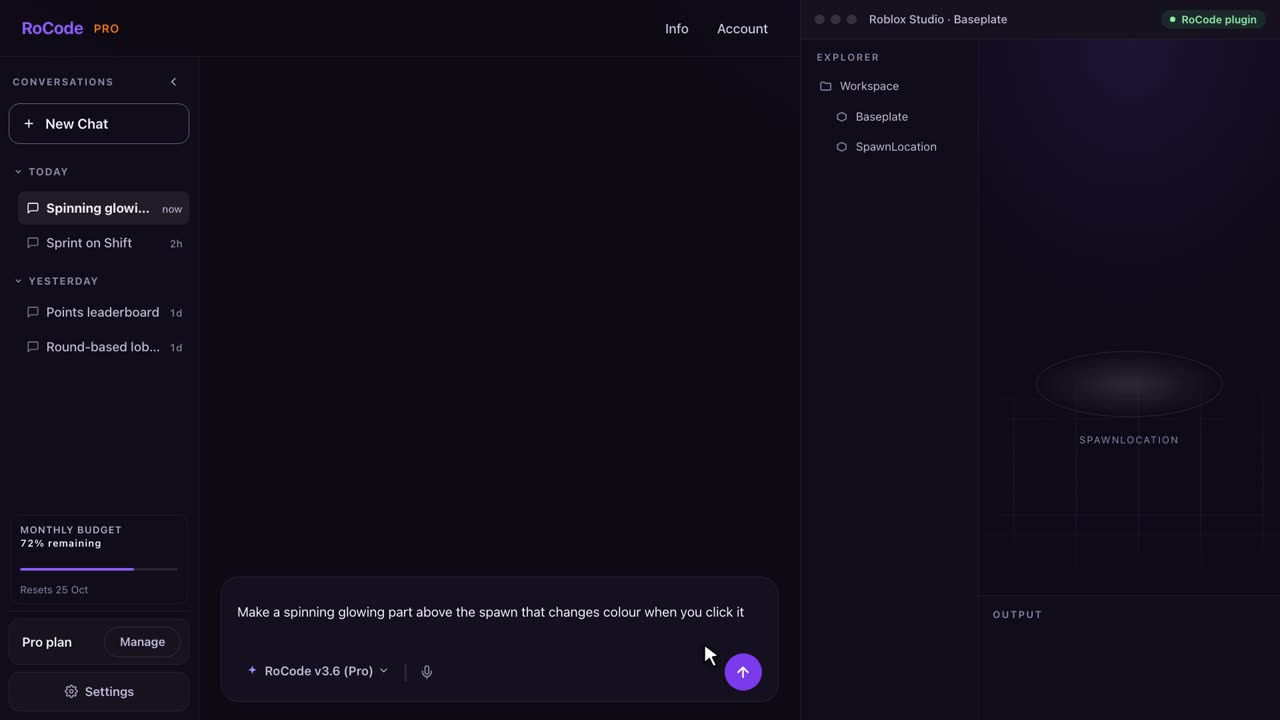
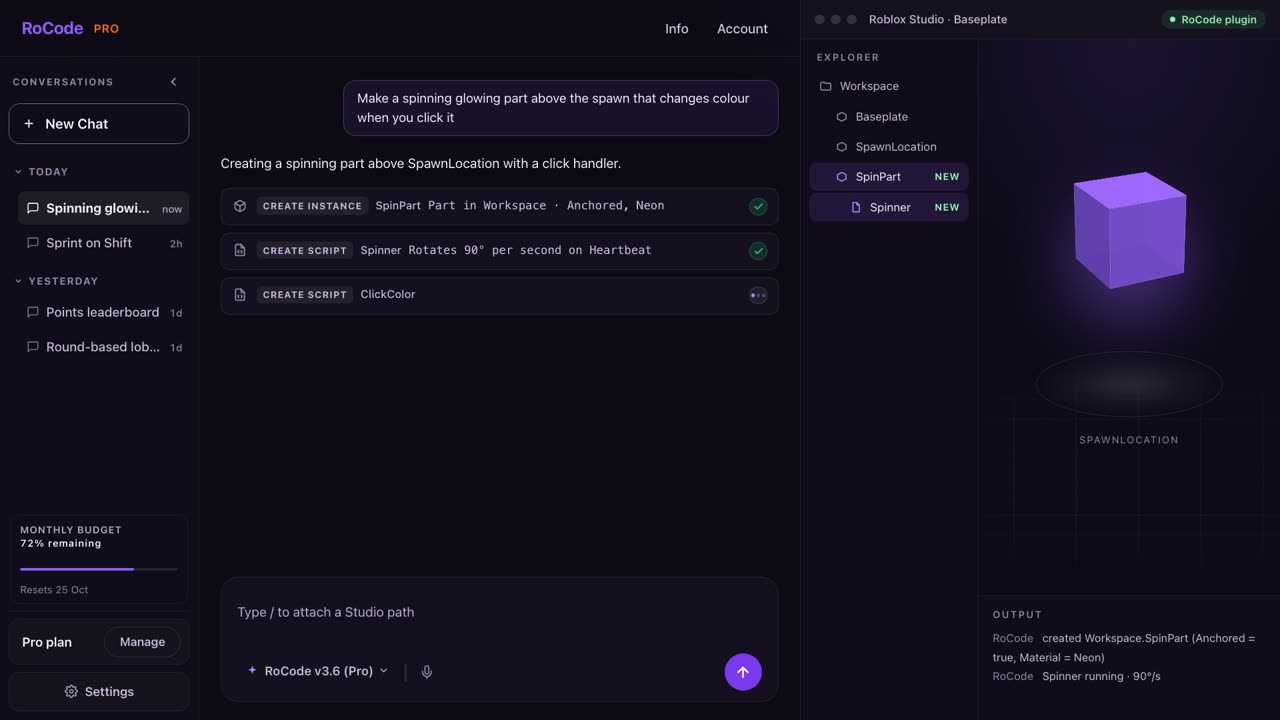
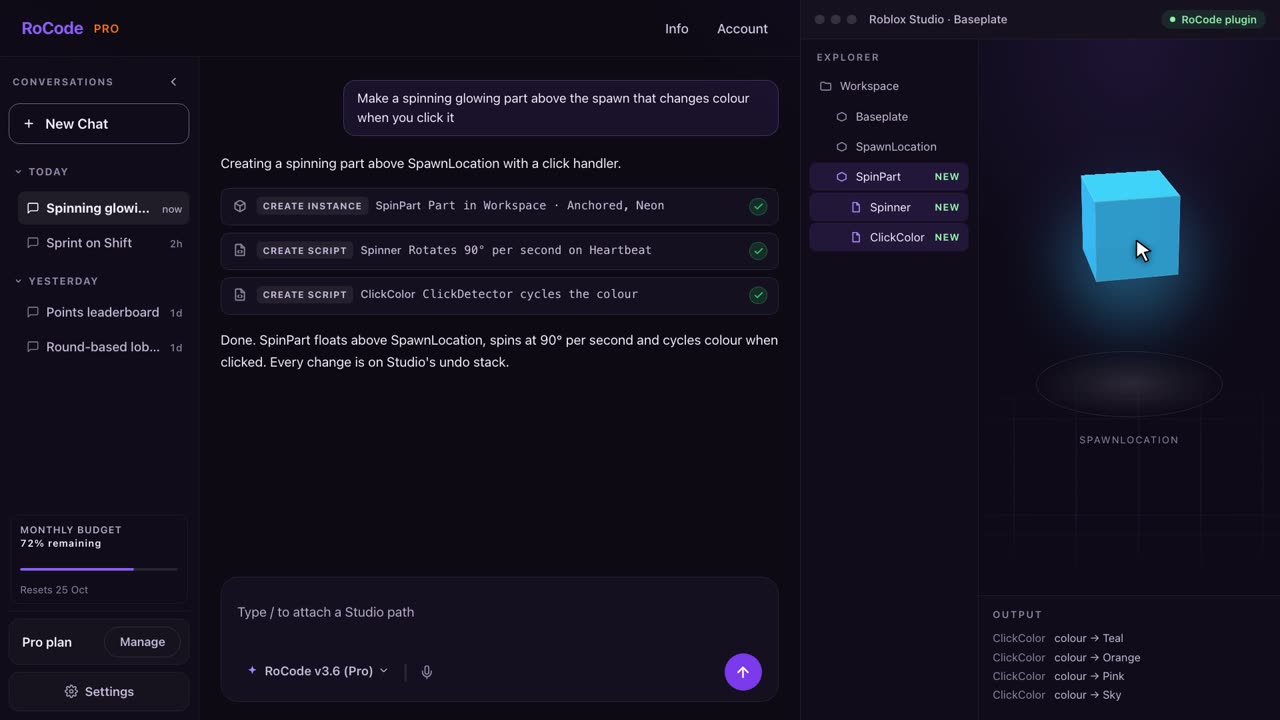
What a RoCode run looks like
Where GenGUI is stronger
- Matching your existing style: add a screenshot of your game and it designs to match.
- Fine-grained editing of each layer in the browser before you export.
- Unlimited free samples to browse, and a cheaper first plan at $9 a month if you only need one screen a month.
- An .rbxmx file you own and can import into any place.
Where RoCode is stronger
- UI that works: RoCode writes the scripts that open, close and update the screens and connect them to your game's values. GenGUI leaves the scripting to you.
- The whole game, not only the UI: scripts, parts, models and features, one round at a time.
- No export and import step: changes land in the place you have open, and each batch is an undo point in Studio.
- A test robot that can play the game after a build and report PASS or FAIL.
- A refund window: in full within 14 days of any payment. GenGUI's terms say it does not offer refunds.
Pricing
What each one costs
RoCode
$9.99a month for Pro, or 1 free credit a day
- Free Starter plan: 1 credit a day, refilled at 00:00 UTC, on GPT-6 Luna, no card.
- Pro $9.99 a month (150 credits), Studio $19.99 (320), Ultra $29.99 (500), in US dollars before tax. Billed yearly, each plan costs 30% less with the same credits.
- A credit measures what a run costs to compute. An advanced task uses about 4 credits and a standard task on GPT-6 Luna about 0.4, at current rates. Long tasks use more.
- Credit packs from 50 credits for $4.99 up to 1,200 credits for $99.99 never expire, and you can buy them on any plan, the free one included.
- Any payment can be refunded in full within 14 days. Paddle is the seller on your receipt.
GenGUI
$9a month for Starter (1 screen), or free samples
- Free: unlimited samples, free editing and export. Your own prompts cost 50 credits per screen.
- Starter $9 a month: 1 screen, 60 credits, rollover up to 120. Creator $19: 3 screens, 150 credits.
- Pro $39 a month: 7 screens, 350 credits. Studio $79: 15 screens, 750 credits.
- Credit packs that never expire: $5 for 30, $10 for 65, $20 for 140, $40 for 300, $75 for 600.
- Its terms say GenGUI does not offer refunds; purchases are non-refundable except where the law requires.
Which one
Which should you pick?
GenGUI is the better choice if you want a UI designed to match a screenshot of your game and are happy to script it yourself: you get an editable .rbxmx to import.
Pick RoCode if you want the UI to work as soon as it lands in your place, with the buttons, windows and counters scripted, and the rest of the game built the same way, with a full refund within 14 days of any payment.
FAQ
Questions
Is RoCode a GenGUI alternative?
Yes, if you want the UI to work as well as look right. GenGUI exports an .rbxmx with the UI objects for you to import and script. RoCode builds the UI in the place you have open in Roblox Studio and writes the scripts that open, close and update it, along with the rest of the game.
Is GenGUI free?
Partly. On 16 November 2026 its site said samples are free and unlimited, and editing and export are free. Generating your own screens costs 50 credits each, which you get from a plan or a credit pack.
How much does GenGUI cost compared with RoCode?
GenGUI Starter is $9 a month for 1 screen (60 credits), Creator $19 for 3, Pro $39 for 7 and Studio $79 for 15. Credit packs run from $5 for 30 credits to $75 for 600, and its terms say it does not offer refunds. RoCode Starter is free with 1 credit a day, Pro is $9.99 a month, Studio $19.99 and Ultra $29.99, with a full refund within 14 days of any payment.
Does GenGUI script the UI?
No. Its guide says you place the exported model under StarterGui and add your own scripts, and that it does not know your game's inventory, purchases, settings or remote events. RoCode writes those scripts in your place.
Sources
- getgengui.com (opens in a new tab) home page and pricing, read 16 November 2026, for inputs, output, plans and credit packs.
- How to Generate Roblox UI With AI (opens in a new tab) its guide, read 16 November 2026, for importing into StarterGui and what you script yourself.
- getgengui.com/terms (opens in a new tab) read 16 November 2026, for refunds.
RoCode facts come from RoCode's pricing page, docs and RoCode facts, checked 16 November 2026. RoCode wrote this page, so we are a competitor. See the full Roblox AI tools comparison.
Try RoCode on your own place.
Free every day, no card required. Install the plugin, describe the feature, and see what lands in Studio.
No card required. Get the Studio plugin (opens in a new tab)