Compared
RoCode vs ForgeGUI
The short answer
ForgeGUI is a website that makes game art from a chat prompt: GUI sets, icons, thumbnails, GFX and 3D props, which you export as PNG, ZIP, GLB or .rbxm files for Roblox Studio and other engines. Its Free plan gives 10,000 credits a month for image generations, and paid plans run from $22 a month (Creator, or $18 a month billed yearly) to $200 (Studio). RoCode works differently: a web chat plus a free Studio plugin that builds inside the place you have open, including working UI with its buttons and counters wired up, not only the images. RoCode gives 1 free credit a day, Pro is $9.99 a month, and any payment can be refunded in full within 14 days.
Checked 16 November 2026 against forgegui.com, its plans page, its docs and its terms.
ForgeGUI here means the AI game-asset generator at forgegui.com. Not to be confused with ForgeBlox (forgeblox.app), a different Roblox AI tool we compare on RoCode vs Forge. Both ForgeGUI and RoCode are independent of Roblox. ForgeGUI makes the pictures and models that go into a game; RoCode builds the game itself, including UI that works, inside your Studio place.
Checked on 16 November 2026 against the ForgeGUI home page, its plans page, its docs (including Exporting to Roblox Studio) and its terms. We did not generate assets with it, so anything those pages don't say is marked as not stated. If something has changed, tell us in the Discord (opens in a new tab) and we will correct it.
| Feature | RoCode | ForgeGUI |
|---|---|---|
| What it is and where it runs | A web chat plus a free plugin from the Roblox Creator Store, in Roblox Studio on Windows or Mac. The chat runs at rocode.app in a desktop browser. Studio connects by itself when it is signed in to the same Roblox account (plugin 3.9.13 or newer), otherwise with a one-time 8-character code. | A website where you chat to generate game assets: GUI sets, icons, thumbnails, GFX and 3D props. You export the results as PNG, ZIP, GLB or .rbxm files. It lists Roblox Studio, UEFN, Unity, Unreal Engine, Minecraft, Blender and mobile as targets. |
| Works on the place you already have open | Yes. It reads the objects and scripts a step needs, then creates and edits them in the place you have open. | No. You export files and bring them into Studio yourself; its site also mentions ForgeMCP for getting assets into Studio but does not explain it on the pages we read. |
| UI | Working UI in your place: a HUD, menu buttons and shop or inventory windows with item cards and prices, laid out in one of five looks with one set of icons drawn by an image model, plus the scripts that open, close and update them from the game's values. | The art for UI: frames, buttons and icons as transparent PNGs sized for their use. Its docs say to upload them to Roblox as image assets and reference them from your ImageLabels and ImageButtons. A guide shows how to turn one base frame into a full GUI kit. |
| Scripts and gameplay | Yes. Scripts, parts, models and UI, one feature or one round of a game at a time, with 27 Studio tools. | Not stated. The pages we read describe asset generation (images, GUI sets, thumbnails, 3D props), not scripts or game logic. |
| Thumbnails, GFX and 3D props | No thumbnails or GFX, and it does not make meshes. It can insert Creator Store models by your words or asset ID. | Yes. Thumbnails, icons and GFX are its core, and 3D props export as GLB or .rbxm with materials. |
| Playtests its own work | Yes, within limits. After a build its test robot can play the game in Studio: it walks, touches parts, clicks buttons, presses keys and equips tools, then reports each check as PASS or FAIL. It cannot tell you whether the game is fun. | Not applicable: it makes assets, not playable games. |
| Free tier | 1 credit a day, refilled at 00:00 UTC, no card. | 10,000 credits a month, image generations only, basic AI models. Removing watermarks starts on Creator, and free or trial generations may be added to its public asset catalog unless you turn that off. |
| Price | Pro $9.99 a month (150 credits), Studio $19.99 (320), Ultra $29.99 (500). Credit packs from $4.99 on any plan. | Creator $22 a month (150K credits), Pro $50 (350K), Studio $200 (1.25M). Yearly billing: $18, $41.50 and $160 a month. |
| Refunds | In full within 14 days of any payment, including renewals and credit packs. | Its terms say paid subscription fees are non-refundable, except when the law requires. |
In practice
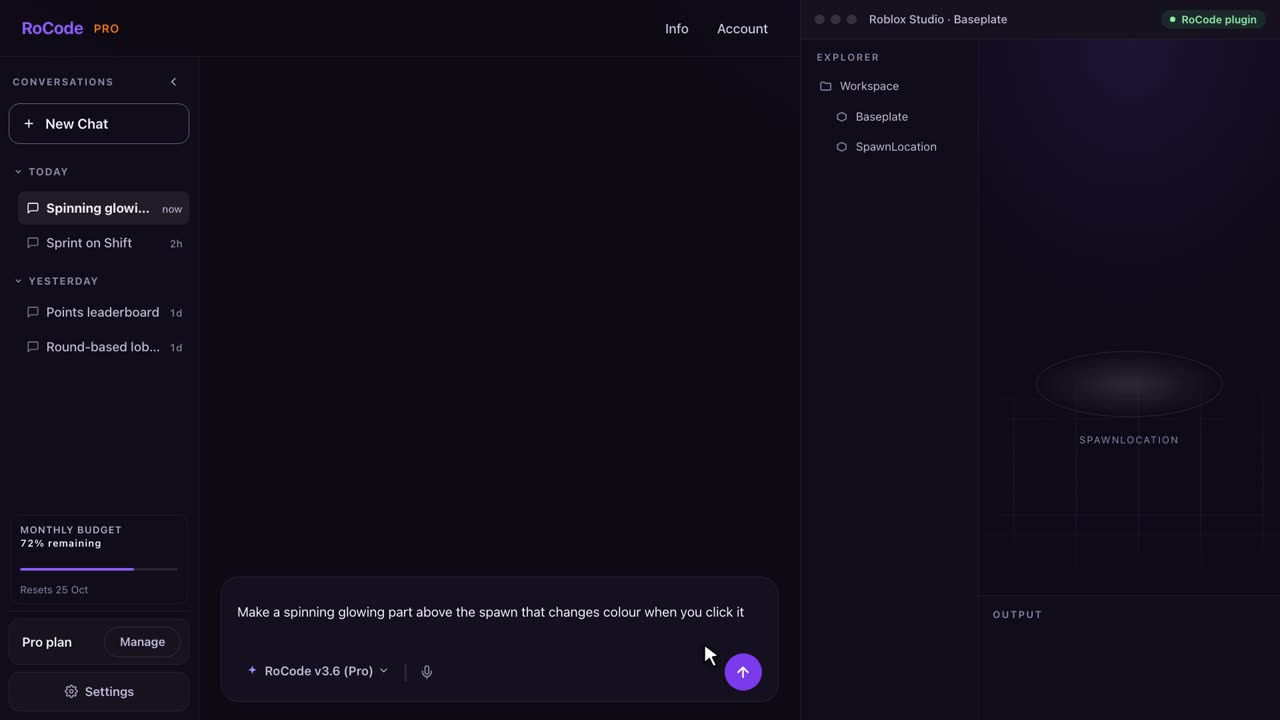
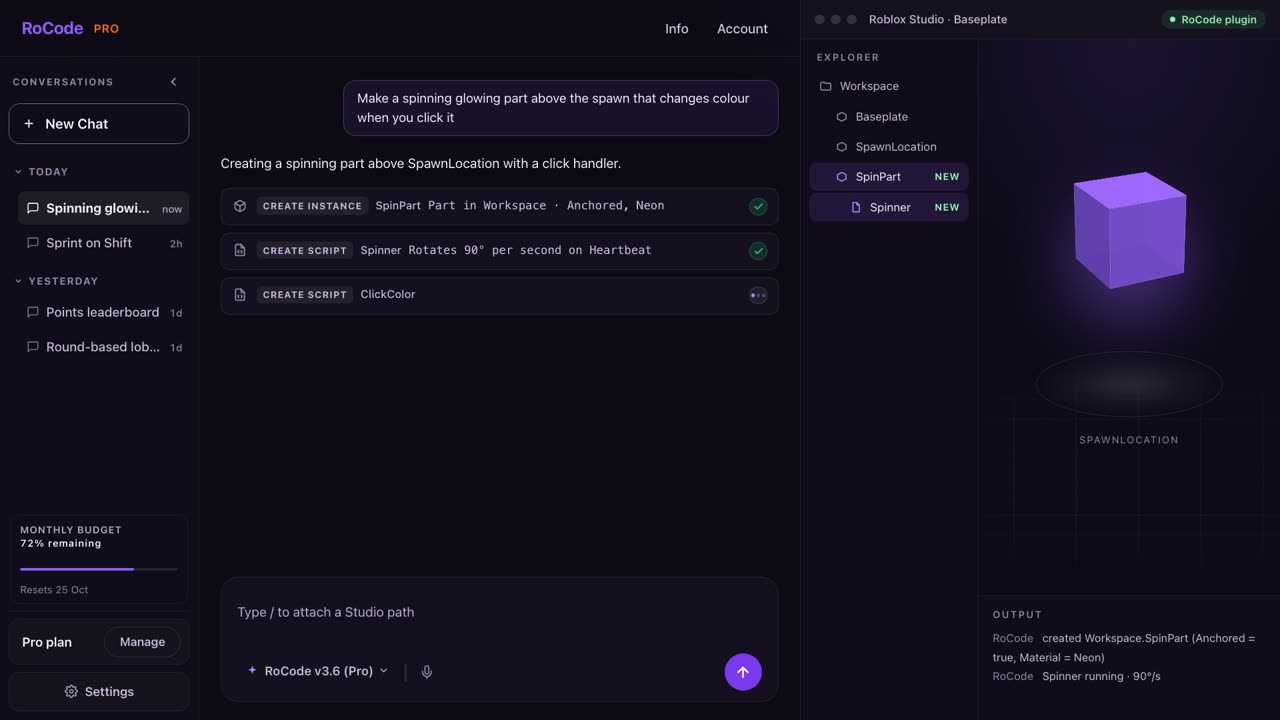
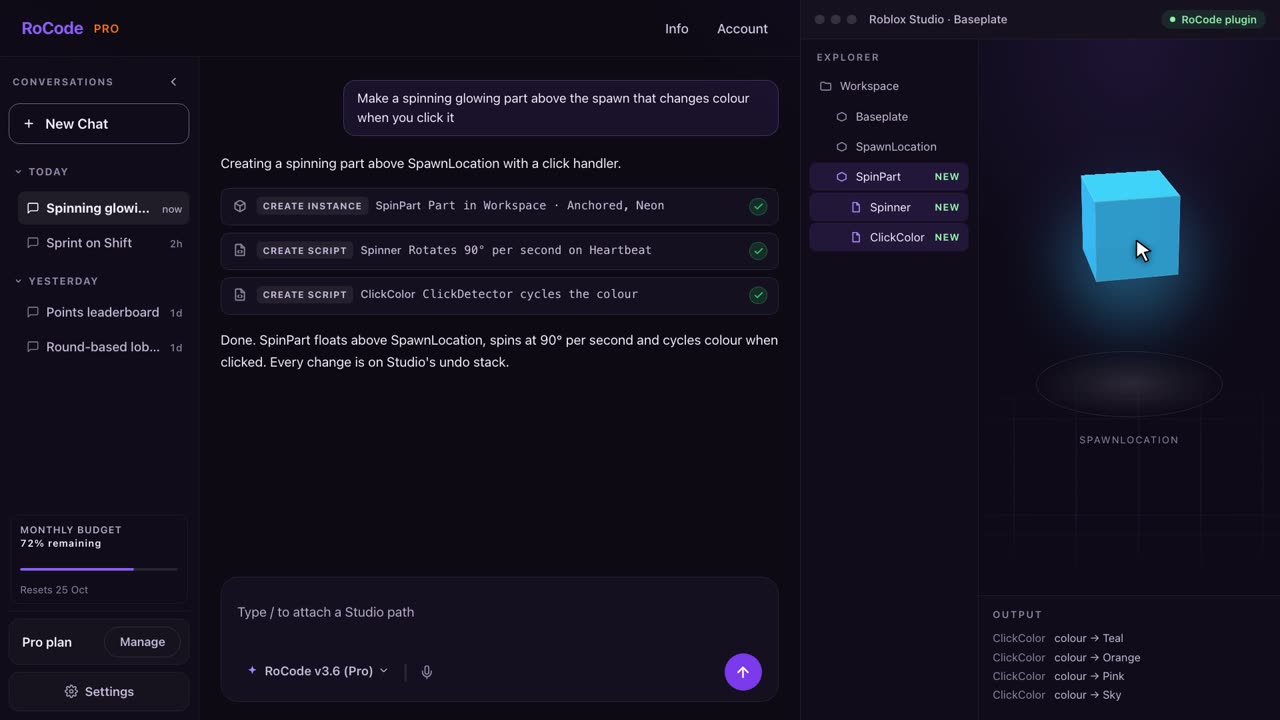
What a RoCode run looks like
Where ForgeGUI is stronger
- Game art of every kind from one chat: thumbnails, icons, GFX, GUI sets and 3D props. RoCode does not make thumbnails, GFX or meshes.
- Works beyond Roblox: it lists UEFN, Unity, Unreal Engine, Minecraft, Blender and mobile as export targets.
- A bigger free allowance for images: 10,000 credits a month on Free, with MCP and API access.
- A Marketplace and very large plans for heavy use, up to 1.25M credits a month on Studio.
Where RoCode is stronger
- UI that works, not only UI art. RoCode builds the screens in your place and writes the scripts that open, close and update them, so a shop button opens the shop and a coin counter follows the coins. With ForgeGUI you upload the images and build and script the UI yourself.
- Whole games and features, not only assets: scripts, parts, models and UI in the place you have open, one round at a time.
- A test robot that can play the game in Studio after a build and report PASS or FAIL.
- A stated refund window: in full within 14 days of any payment. ForgeGUI's terms say paid subscription fees are non-refundable.
- A lower first paid step: Pro is $9.99 a month. ForgeGUI Creator is $22 a month, or $18 billed yearly.
- Your free work stays private. ForgeGUI says free or trial generations may go into its public catalog unless you switch that off.
Pricing
What each one costs
RoCode
$9.99a month for Pro, or 1 free credit a day
- Free Starter plan: 1 credit a day, refilled at 00:00 UTC, on GPT-6 Luna, no card.
- Pro $9.99 a month (150 credits), Studio $19.99 (320), Ultra $29.99 (500), in US dollars before tax. Billed yearly, each plan costs 30% less with the same credits.
- A credit measures what a run costs to compute. An advanced task uses about 4 credits and a standard task on GPT-6 Luna about 0.4, at current rates. Long tasks use more.
- Credit packs from 50 credits for $4.99 up to 1,200 credits for $99.99 never expire, and you can buy them on any plan, the free one included.
- Any payment can be refunded in full within 14 days. Paddle is the seller on your receipt.
ForgeGUI
$22a month for Creator, or 10,000 free credits a month for images
- Free $0: 10,000 credits a month, image generations only, basic AI models, MCP and API access, Marketplace access and commercial use rights.
- Creator $22 a month, or $18 a month billed yearly: 150K credits a month, no watermarks, advanced and premium models, credit top-ups.
- Pro $50 a month, or $41.50 billed yearly: 350K credits a month and all models. Studio $200 a month, or $160 billed yearly: 1.25M credits a month.
- Different generation types cost different numbers of credits; the plans page does not list them. Unused credits from a plan you upgrade from are kept as top-ups that never expire.
- Its terms say paid subscription fees are non-refundable, except when the law requires.
Which one
Which should you pick?
ForgeGUI is the better choice if what you need is art: a thumbnail, an icon set, GFX, a GUI kit to style by hand, or 3D props, for Roblox or for other engines. You will build and script the UI in Studio yourself.
Pick RoCode if you want the UI and the game to work in the place you already have open in Roblox Studio on Windows or Mac: screens, buttons and counters built and wired up, features scripted, a test robot that plays it after a build, and a full refund within 14 days of any payment. Many creators use both: ForgeGUI for thumbnails and GFX, RoCode for the game.
FAQ
Questions
Is RoCode a ForgeGUI alternative?
For UI, yes, in a different way. ForgeGUI generates the art (frames, buttons, icons) as image files you upload to Roblox and place yourself. RoCode builds the UI in the place you have open in Roblox Studio, with the scripts that make the buttons, windows and counters work. If you only need images, thumbnails or 3D props, ForgeGUI does more of that than RoCode.
Is ForgeGUI free?
It has a Free plan. On 16 November 2026 its plans page listed 10,000 credits a month on Free, for image generations only, with basic AI models, MCP and API access and commercial use rights. Removing watermarks starts on the paid Creator plan, and generations made with free or trial credits may be added to its public asset catalog unless you turn that off in your account.
How much does ForgeGUI cost compared with RoCode?
ForgeGUI Creator is $22 a month ($18 a month billed yearly) for 150K credits, Pro $50 ($41.50 yearly) for 350K and Studio $200 ($160 yearly) for 1.25M, and its terms say paid subscription fees are non-refundable except where the law requires. RoCode Starter is free with 1 credit a day, Pro is $9.99 a month, Studio $19.99 and Ultra $29.99, with a full refund within 14 days of any payment.
Does ForgeGUI work inside Roblox Studio?
It exports to Studio rather than building in it. Its docs say GUI frames, icons and thumbnails export as transparent PNGs that you upload as image assets and reference from ImageLabels and ImageButtons, and 3D props export as .rbxm files with materials. Its site also mentions ForgeMCP for bringing assets into Studio. RoCode creates the UI objects and scripts directly in the place you have open.
Sources
- forgegui.com (opens in a new tab) home page, read 16 November 2026, for what it makes, export formats, targets and the public catalog note.
- forgegui.com/plans (opens in a new tab) read 16 November 2026, for every plan, credits, features and yearly prices.
- Exporting to Roblox Studio (opens in a new tab) in its docs, read 16 November 2026, for how UI images and 3D props get into Studio.
- forgegui.com/terms (opens in a new tab) read 16 November 2026, for refunds and the generated asset catalog.
RoCode facts come from RoCode's pricing page, docs and RoCode facts, checked 16 November 2026. RoCode wrote this page, so we are a competitor. See the full Roblox AI tools comparison.
Try RoCode on your own place.
Free every day, no card required. Install the plugin, describe the feature, and see what lands in Studio.
No card required. Get the Studio plugin (opens in a new tab)