Compared
RoCode vs Kiwari
The short answer
Kiwari is a desktop app with an AI agent that works next to Roblox Studio; on 23 October 2026 its download page offered macOS only, with Windows coming soon. Its free Lite tier gives daily usage on one basic text-only model, and Pro is $19.99 a month or $199 a year. RoCode runs in a desktop browser with a free Studio plugin on Windows or Mac, gives 1 free credit a day, Pro is $9.99 a month, and any payment can be refunded in full within 14 days.
Checked 23 October 2026 against kiwari.dev, its pricing, download and terms pages.
Kiwari here means the Roblox Studio AI agent at kiwari.dev. Both tools read and edit the place you have open in Studio. Kiwari is a desktop app you install; RoCode is a web chat plus a free Studio plugin. The other differences are platforms, the free tier, price and what each adds on top.
Checked on 23 October 2026 against the Kiwari home page (features, plans, FAQ and latest updates), its pricing page, its download page and its terms. We did not install the app, so anything those pages don't say is marked as not stated. If something has changed, tell us in the Discord (opens in a new tab) and we will correct it.
| Feature | RoCode | Kiwari |
|---|---|---|
| What you install and where it runs | A free plugin from the Roblox Creator Store, in Roblox Studio on Windows or Mac. The chat runs at rocode.app in a desktop browser. Studio connects by itself when it is signed in to the same Roblox account (plugin 3.9.13 or newer), otherwise with a one-time 8-character code. | A desktop app that works next to Roblox Studio, not a plugin. Its download page offered macOS builds (Apple silicon and Intel) only; Windows was "coming soon", with a waitlist. |
| Sign-in | Email code, Google, Discord or Roblox at rocode.app, with no RoCode password. | Sign in with Roblox, per its free plan. |
| Works on the place you already have open | Yes. It reads the objects and scripts a step needs, then creates and edits them in the place you have open. | Yes. Its FAQ says it reads and edits the open place: scripts, UI, assets and playtests. You approve every change unless you turn on Run everything. |
| What it builds | Scripts, parts and UI, one feature or one round of a game at a time, with 27 Studio tools. Ready-made UI kits: 10 screens (HUD, pet inventory, store, daily rewards, item shop, egg hatching, rebirth, settings, daily quests, loading screen) in 5 themes, animated, with working server scripts, inserted in one step. Themed world islands (volcano, desert canyon, jungle or snow) in one call. | Features, UI, assets and animations, per its home page. It also generates models, meshes and textures, on the free tier too, and you can pick Toolbox assets in the chat. |
| Playtests its own work | Yes, within limits. After a build its test robot can play the game in Studio: it walks, touches parts, clicks buttons, presses keys and equips tools, then reports each check as PASS or FAIL (plugin 3.9.11 or newer; keys and clicks need 3.9.15 or newer). The agent decides when to test, and it cannot tell you whether the game is fun. | Yes. Every plan lists "Playtest and debug live"; Pro adds visual checks with screenshots. |
| Models | DeepSeek V4 Flash on every plan. GLM 5.3 Flash and Claude Sonnet 5.5 from Pro, Claude Opus 5.5 from Studio, GPT-6 Astra on Ultra. Any paid plan can also run your own OpenRouter key. | One basic text-only model on the free tier, extra usage for stronger models on Pro, frontier models on Pro+. Its pages do not name the models. |
| Free tier | 1 credit a day (2 on the day you sign up), refilled at 00:00 UTC, no card. After a few builds, free accounts are asked to join the RoCode Discord to keep getting free credits. | Kiwari Lite: daily usage on one basic text-only model, with limited doc lookups and no images or screenshots. |
| Price | Pro $9.99 a month (150 credits), Studio $19.99 (320), Ultra $29.99 (500). Credit packs from $4.99 on any plan. | Pro $19.99 a month or $199 a year (shown as $17 a month), with weekly usage resets. Pro+ $59.99 a month or $599 a year, with 4x Pro's usage. |
| Refunds | In full within 14 days of any payment, including renewals and credit packs. | Not stated. Its terms say billing, taxes and refunds may be governed by the payment provider's terms. |
In practice
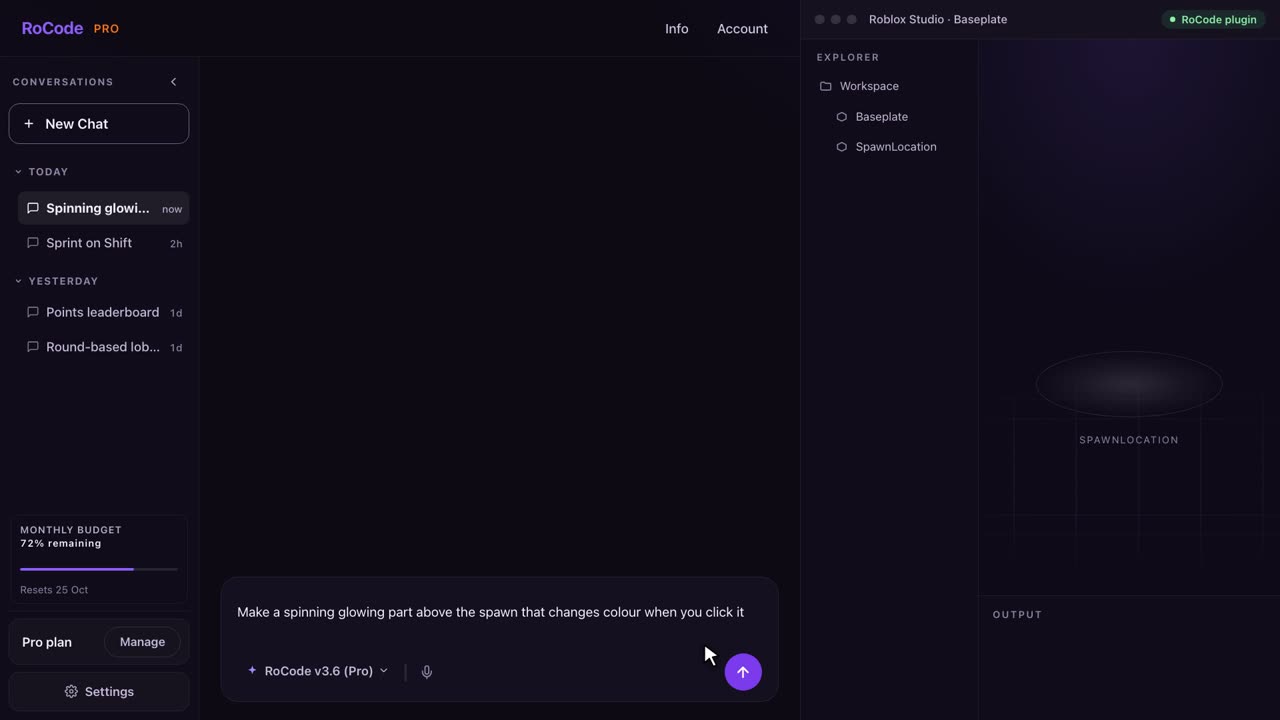
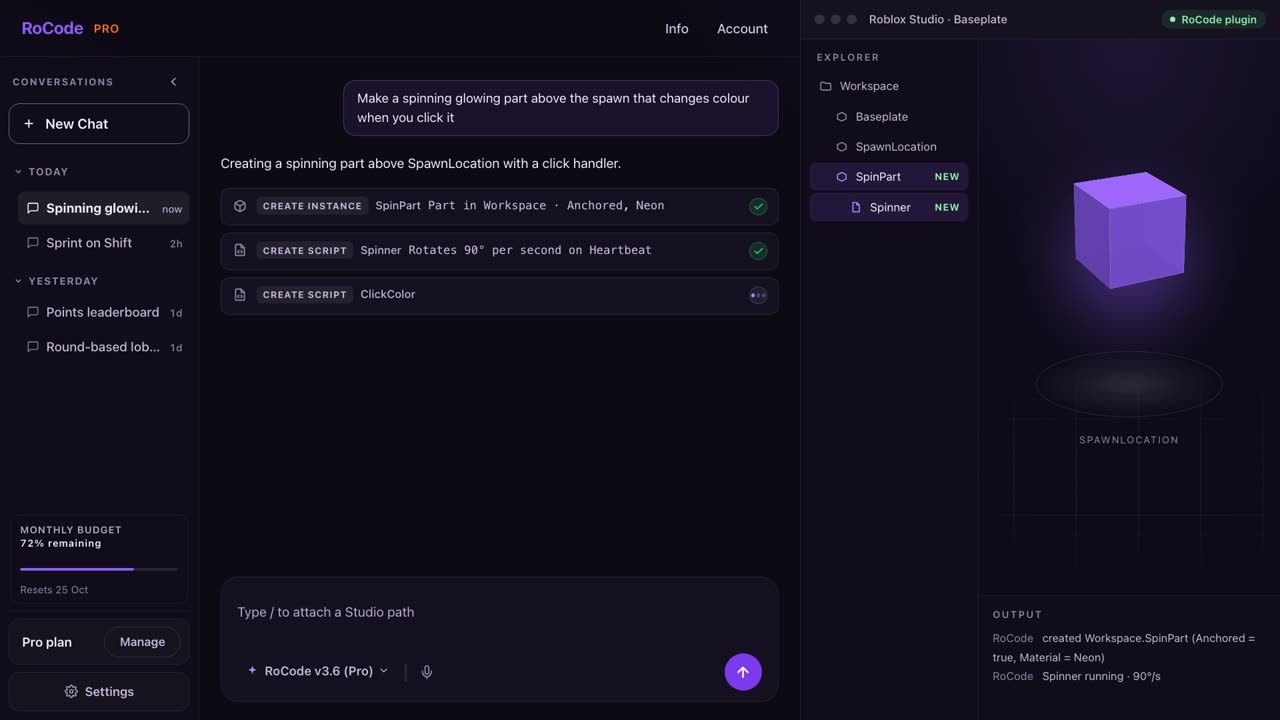
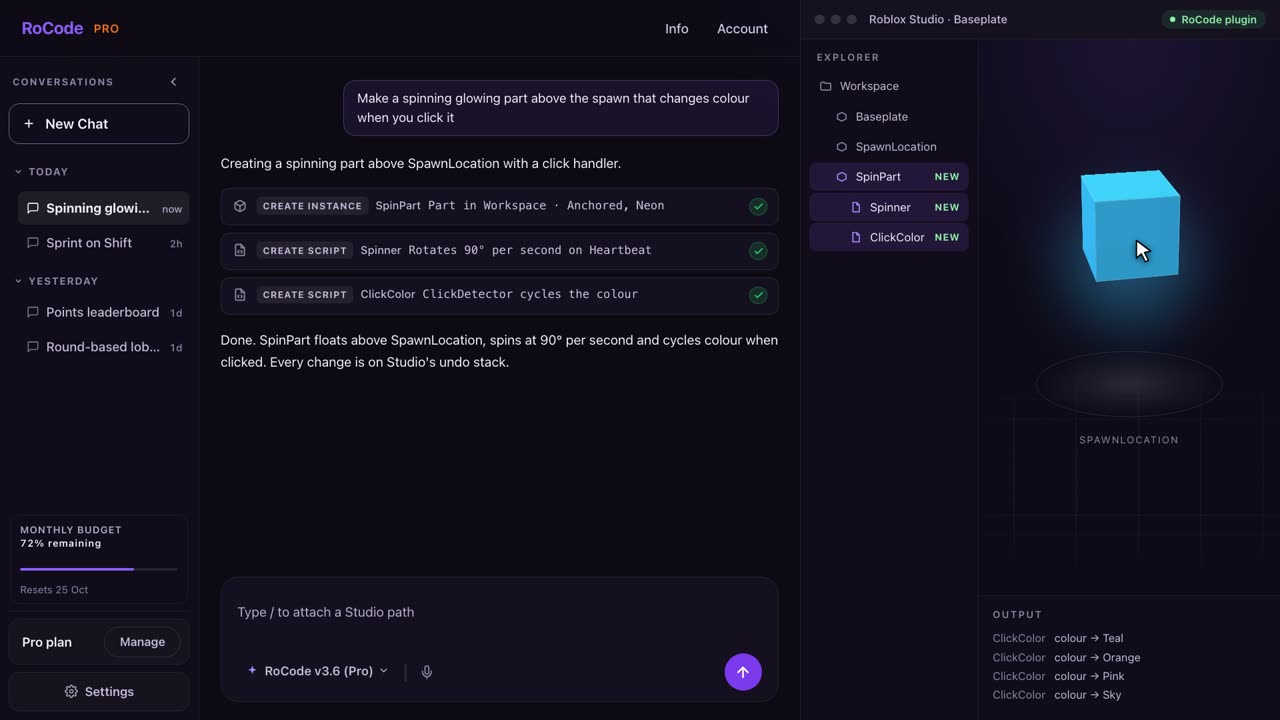
What a RoCode run looks like
Where Kiwari is stronger
- You approve every change, unless you turn on Run everything. For larger tasks it asks clarifying questions and makes a plan before it builds. RoCode builds as soon as you send, and each batch is an undo point instead.
- Asset generation: models, meshes and textures, even on its free tier, plus Toolbox assets picked in the chat. RoCode does not generate meshes or search the Toolbox.
- Subagents that run in parallel to explore, review, script and build, and a search of up-to-date Roblox docs.
- Projects that group chats across several places.
Where RoCode is stronger
- Windows. RoCode works with Roblox Studio on Windows or Mac. Kiwari's download page offered macOS only, with Windows coming soon.
- Nothing to install beyond a Studio plugin from the Creator Store. Studio connects by itself on the same Roblox account.
- A lower first paid plan: Pro is $9.99 a month at RoCode and $19.99 at Kiwari ($199 a year).
- A stated refund window: in full within 14 days of any payment. Kiwari's pages do not state a refund policy.
- Named models by plan, from DeepSeek V4 Flash on every plan to Claude Opus 5.5 and GPT-6 Astra, or your own OpenRouter key. Kiwari's pages do not name its models.
- Ready-made UI kits, 10 animated screens in 5 themes with working server scripts, and themed world islands, each in one step.
- A free plan that reads images: RoCode accepts image attachments on every plan, the free one included. Kiwari Lite takes no images or screenshots.
Pricing
What each one costs
RoCode
$9.99a month for Pro, or 1 free credit a day
- Free Starter plan: 1 credit a day, 2 on the day you sign up and 2 on the day you join the RoCode Discord, refilled at 00:00 UTC, on DeepSeek V4 Flash, no card. After a few builds, free accounts are asked to join the RoCode Discord to keep getting free credits.
- Pro $9.99 a month (150 credits), Studio $19.99 (320), Ultra $29.99 (500), in US dollars before tax. Billed yearly, each plan costs 30% less with the same credits.
- A credit measures what a run costs to compute. An advanced task uses about 4 credits and a standard task on DeepSeek V4 Flash about 0.4, at current rates. Long tasks use more.
- Credit packs from 50 credits for $4.99 up to 1,200 credits for $99.99 never expire, and you can buy them on any plan, the free one included.
- Any payment can be refunded in full within 14 days. Paddle is the seller on your receipt.
Kiwari
$19.99a month for Pro, or free Lite
- Kiwari Lite: free, daily usage on one basic text-only model, refilled every day.
- Pro $19.99 a month or $199 billed yearly (shown as $17 a month). Usage resets every week, and you can top up credits.
- Pro+ $59.99 a month or $599 billed yearly (shown as $50 a month), with frontier models and 4x the usage of Pro.
- When usage runs out you can upgrade, turn on credit overages or wait for the reset. Cancel in the app and keep the plan to the end of the paid period.
- No refund policy on its pages; its terms say the payment provider's terms may apply.
Which one
Which should you pick?
Pick Kiwari if you are on a Mac and want to approve each change, have it plan larger tasks first, or generate meshes and textures, even on the free tier.
Pick RoCode if you are on Windows or Mac and want nothing to install beyond a plugin, a lower first paid plan, named models, ready-made UI kits and themed worlds, a test robot that plays the game after a build, and a full refund within 14 days of any payment. See plans and prices.
FAQ
Questions
Is RoCode a Kiwari alternative?
Yes. Both are AI agents that read and edit the Roblox Studio place you have open. Kiwari is a desktop app, macOS only on 23 October 2026. RoCode is a web chat plus a free Studio plugin, works with Studio on Windows or Mac, gives 1 free credit a day, and Pro is $9.99 a month.
Does Kiwari work on Windows?
Not on 23 October 2026. Its download page offered macOS builds for Apple silicon and Intel, and its FAQ said Windows was coming, with a waitlist. RoCode works with Roblox Studio on Windows or Mac.
How much does Kiwari cost compared with RoCode?
Kiwari Lite is free on one basic text-only model, Pro is $19.99 a month or $199 a year, and Pro+ is $59.99 a month or $599 a year. RoCode's Starter plan is free with 1 credit a day, Pro is $9.99 a month, Studio $19.99 and Ultra $29.99, with a full refund within 14 days of any payment.
Sources
- kiwari.dev (opens in a new tab) home page and FAQ, read 23 October 2026, for what it is, approvals, subagents, asset generation and its latest updates.
- kiwari.dev/pricing (opens in a new tab), read 23 October 2026, for Lite, Pro and Pro+.
- kiwari.dev/download (opens in a new tab), read 23 October 2026, for the macOS builds.
- kiwari.dev/terms (opens in a new tab), read 23 October 2026, for payments and refunds.
RoCode facts come from RoCode's pricing page, docs and RoCode facts, checked 23 October 2026. RoCode wrote this page, so we are a competitor. See the full Roblox AI tools comparison.
Try RoCode on your own place.
Free every day, no card required. Install the plugin, describe the feature, and see what lands in Studio.
No card required. Get the Studio plugin (opens in a new tab)