Compared
RoCode vs RoAI (roai.studio)
RoAI here means the Roblox AI tool at roai.studio, which also calls itself RoAI Studio. In short, both are AI agents that change the Roblox Studio place you have open through a free Creator Store plugin, with your prompts typed in a web app. RoAI charges by effort level on Google Gemini models, shows a plan before it builds and, by its own account, also makes terrain, low-poly models and sounds. RoCode lets you pick the model, gives 3 free credits a day, and builds scripts, parts and UI one feature at a time.
Checked against RoAI’s own public pages and its Roblox Creator Store listing on 9 October 2026. This is not roai.com, an unrelated blog about the return on AI, and not RoStudio (rostud.io) or Ropilot, which are different Roblox AI tools. Prices change, and RoAI was running a first-month sale when we checked, so confirm on its pricing page before you buy. If something has changed, tell us in the Discord (opens in a new tab) and we will correct it.
How RoCode connects
Nothing to install on the PC beyond the plugin. Studio connects to the chat with an 8-character code, then reconnects on its own. There is no place-file upload and no background sync.
How RoAI connects
You link your Roblox account, then click “Link with Roblox” in the plugin. The plugin syncs your place’s structure to RoAI and applies changes after you approve a plan. The editor sleeps after 60 seconds of inactivity until you click “I’m here” on the website.
| Feature | RoCode | RoAI |
|---|---|---|
| What you install and where it runs | A free plugin from the Roblox Creator Store, in Roblox Studio on Windows or Mac. You type in a web chat at rocode.app in a desktop browser; phones aren’t supported. | A free plugin from the Roblox Creator Store, listed as RoAI Studio. You type prompts in the RoAI web app. Its pages say it runs in Studio on Windows and macOS. |
| How Studio connects | Type the 8-character code from the RoCode panel into the chat, then confirm in Studio. After that the plugin reconnects on its own. | Link your Roblox account in Settings, then click “Link with Roblox” in the plugin. The editor sleeps after 60 seconds of inactivity until you click “I’m here”. |
| Sign-in | Email code, Google, Roblox or Discord at rocode.app. | Roblox (its recommended option) or email and password. A linked Roblox account is required to use RoAI. |
| Works on the place you already have open | Yes. It reads the objects and scripts a step needs, then creates and edits them in place. No place-file upload and no background sync. | Yes, by its own description. The plugin syncs your place’s structure (part names, scripts, properties) live, and since 8 October 2026 RoAI says it reads the whole place. |
| Before it changes anything | Build mode makes changes as the run goes, and every step shows in the chat with the path it touched. Ask mode can say what it would change and where without changing anything. You can stop a run at any time, and changes so far stay. | It shows a plan with each step and an estimated credit cost. You approve, modify or cancel before anything changes. |
| Ask questions without changes | Yes. Ask mode answers questions about your place with read-only tools and changes nothing. | Yes. Chat mode answers questions about your game, and chat costs no credits on any plan. |
| What it builds | Scripts, parts and UI, one feature at a time: 24 Studio tools, 12 ready-made structures built from parts, 6 UI layouts. No terrain, meshes or Creator Store models. | By its own account: Luau scripts and full systems, UI, low-poly models, voxel terrain and sounds chosen from the Creator Store, with image references from Starter. |
| Checks and playtests | Compile-checks the scripts it writes inside Studio and reads the Output of playtests you run. It does not start playtests. | Says it monitors for errors and retries, and since 8 October 2026 checks pictures of the models it built and the layout of its screens. Its guides tell you to run Play Solo yourself. |
| Undo in Studio | Yes. Each batch of RoCode changes is an undo point in Studio’s history. A longer run takes several presses of Ctrl+Z. | Yes, by its own pages: changes are versioned and revertible, with undo, redo and a build timeline. Its privacy policy says version snapshots expire after 7 days. |
| Models | DeepSeek V4 Flash and GPT-OSS 120B on every plan. GLM 5.3 and Claude Sonnet 5.5 on Pro, Claude Opus 5.5 on Studio and up, GPT-6 Astra on Ultra and up. Or your own OpenRouter key on any paid plan. | Google Gemini models through the Lovable AI Gateway, according to its privacy policy. No model picker or own key on its public pages, and the exact model is not named. |
| How runs are charged | By model and run length: stronger models and longer runs use more credits. The chat shows the credits a run is using while it works and the total under every reply. | By effort level. A Light build typically uses about 20 credits, Standard about 70 and Deep about 300, by its own figures. You see an estimate first and the charge after. |
| Free plan | Starter: 3 credits a day on DeepSeek V4 Flash or GPT-OSS 120B, no card. | £0 with 0 credits a month. Chat and plan previews are free; building needs credits from a top-up, a paid plan or an occasional bonus its terms mention. |
| Price | Pro $9.99 a month, Studio $24.99, Ultra $49.99, Max $99.99, in US dollars before tax. Billed yearly, 30% less. | Starter £12 a month, Creator £32, Pro £75, shown in pounds on 9 October 2026. Standard effort needs Creator; Deep needs Pro. |
| Refunds | In full within 14 days of any payment, for any reason, including renewals and credit packs. | Unused purchases within 14 days for UK and EU consumers. Once used, for faults reported within 14 days or at its discretion. A run that fails on its side before any edits is not charged. |
In practice
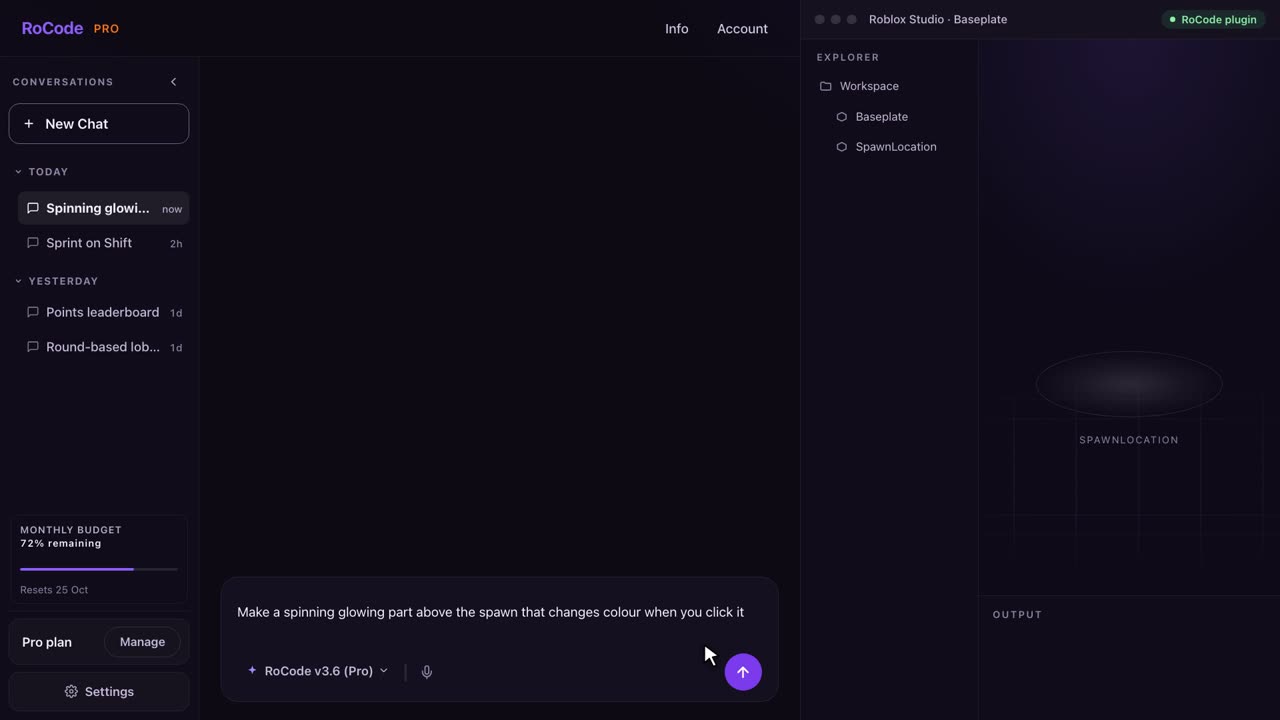
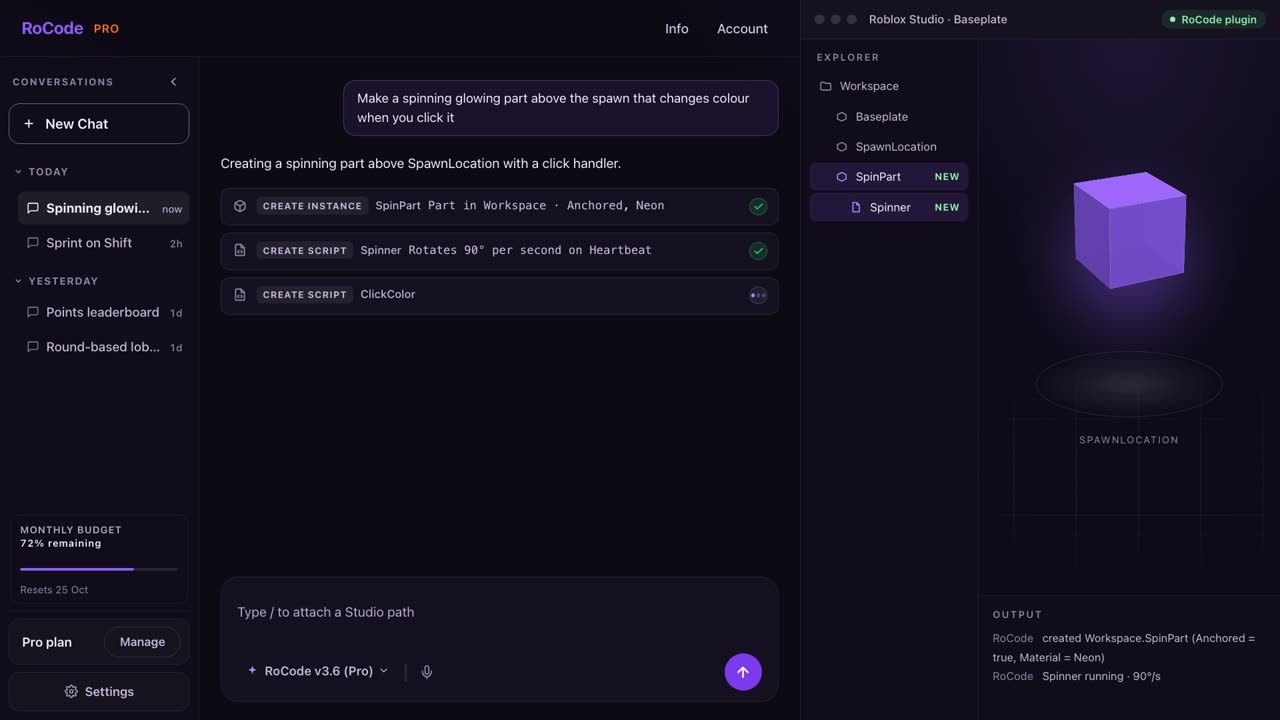
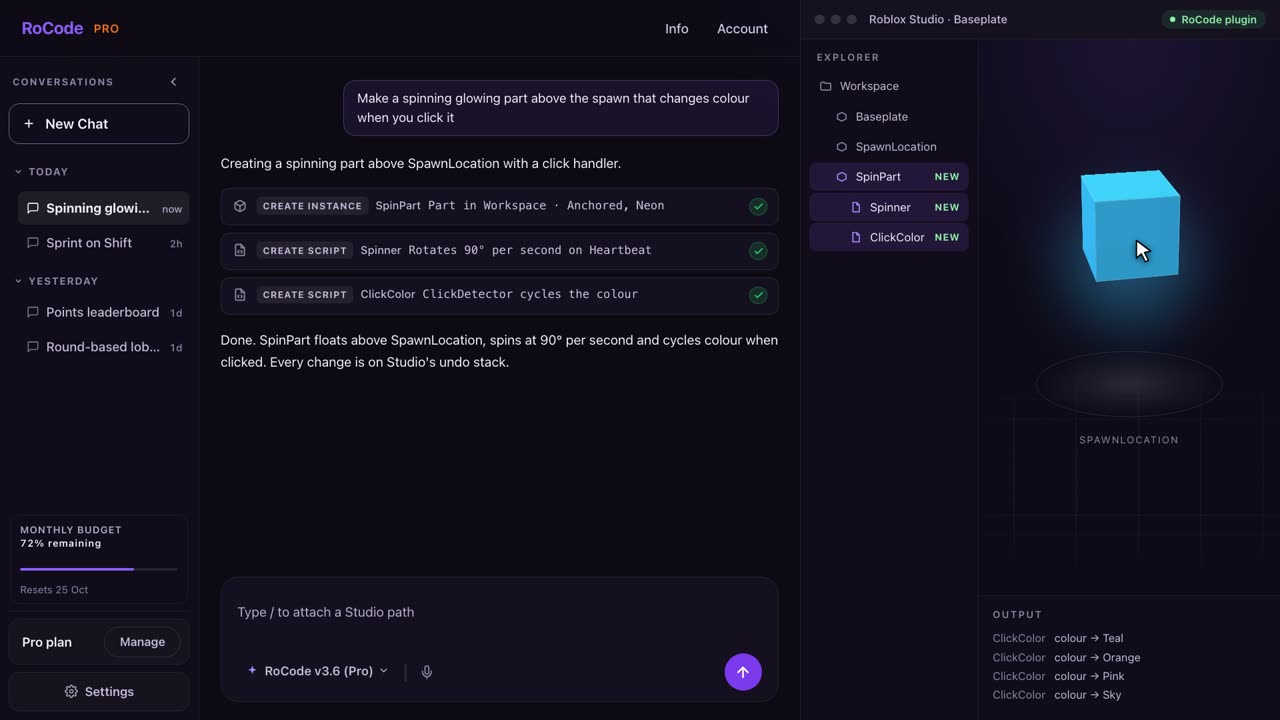
What a RoCode run looks like
Where RoAI is stronger
- It builds more kinds of things, by its own account: voxel terrain, low-poly models and sounds chosen from Roblox’s Creator Store, as well as scripts and UI, with image reference uploads from Starter. RoCode builds scripts, parts and UI; it does not sculpt terrain, generate meshes or insert models from the Creator Store.
- A plan before anything changes. Its Live Game Editor shows what it will create or modify and an estimated credit cost, and you approve, modify or cancel. Chat, clarifying questions and plan previews cost no credits on any plan.
- You choose how much gets built in one run: Light, Standard or Deep effort, from about 20 to about 300 credits a run by its own figures. Standard needs the Creator plan and Deep needs Pro.
- Credits that never expire, monthly plan credits included, and top-ups on every plan, Free included. RoCode’s plan credits do not carry over, and its credit packs, which never expire, are for paid plans only.
- It looks at what it built. Since its 8 October 2026 update, RoAI says it views pictures of a model from several angles with a player for scale and checks the layout of screens it builds. RoCode does not take screenshots of your game, though you can attach your own for Claude Sonnet 5.5, Claude Opus 5.5 or GPT-6 Astra.
- Team seats: its Pro plan includes 5 seats, and owners can share credits with members.
- A visible record on Roblox’s Creator Store: on 9 October 2026 its plugin listing showed a 90% rating from 200+ votes and 39 reviews (Roblox’s figures), created 23 December 2025 and updated 7 October 2026.
Where RoCode is stronger
- A free plan that builds. Starter gives 3 credits a day on DeepSeek V4 Flash or GPT-OSS 120B, with all 24 Studio tools and no card. RoAI’s Free plan has 0 monthly credits, so building there needs a top-up, a paid plan or one of the occasional bonus grants its terms mention.
- A choice of model: DeepSeek V4 Flash and GPT-OSS 120B on every plan, GLM 5.3 and Claude Sonnet 5.5 on Pro, Claude Opus 5.5 from Studio, GPT-6 Astra from Ultra, or your own OpenRouter key and a tool-calling model on any paid plan. RoAI’s privacy policy says it runs on Google Gemini models, and its public pages show no model picker.
- A refund for any reason. Any RoCode payment, including renewals and credit packs, can be refunded in full within 14 days, wherever you live. RoAI refunds unused purchases within 14 days for UK and EU consumers; once credits are used, refunds are for faults or at its discretion.
- No background sync. RoCode uploads no place file and does not sync your place in the background; it reads objects and scripts when a step of a run asks. RoAI’s plugin syncs your place’s structure, script contents and properties to its servers while it is connected, so that its AI can understand your project, in its words.
- No Roblox account link needed to sign in: use an email code, Google, Roblox or Discord. RoAI requires a linked Roblox account.
Pricing
What each one costs
RoCode
$9.99a month for Pro, or free every day
- Free Starter plan: 3 credits a day on DeepSeek V4 Flash or GPT-OSS 120B, refilled at 00:00 UTC, no card. That is enough for a few small tasks a day.
- Pro $9.99 a month (150 credits), Studio $24.99 (400), Ultra $49.99 (900), Max $99.99 (2,000). Billed yearly, each plan costs 30% less with the same credits.
- A credit measures what a run costs to compute. Advanced tasks run on GLM 5.3 (about 4 credits each) and standard tasks on DeepSeek V4 Flash (about 0.4), at current rates. Long tasks use more. On that basis Pro covers about 35 advanced or 375 standard tasks a month.
- Plan credits do not carry over. Credit packs from 50 credits for $4.99 up to 800 credits for $54.99 are for paid plans and never expire.
- Your own OpenRouter key and a model you choose on any paid plan, billed by OpenRouter, not by RoCode.
- Any payment can be refunded in full within 14 days. Paddle is the seller on your receipt.
RoAI
£12a month for Starter; the Free plan has 0 credits
- Free £0 with 0 credits a month and 3 connected games. Chat, clarifying questions and plan previews are free on every plan. Its terms say it sometimes grants bonus credits at its discretion, for example for linking a Roblox account; no amount is published.
- Starter £12 a month (100 credits, Light builds, 15 games), Creator £32 (280 credits, up to Standard, 30 games), Pro £75 (600 credits, up to Deep, unlimited games, 5 team seats). Its home page says annual plans save 17%.
- Typical cost per run, by its own figures: Light about 20 credits in 20 to 40 seconds, Standard about 70 in 1.5 to 3 minutes, Deep about 300 in 5 to 10 minutes.
- Our arithmetic from those typical figures: Starter’s 100 credits cover about 5 Light builds a month, Creator’s 280 about 4 Standard builds and Pro’s 600 about 2 Deep builds. Real costs vary with the size of the run.
- Top-ups on any plan, and credits never expire: a custom amount from 25 credits at £0.20 each, 100 credits for £20, 350 for £63 or 1,250 for £188.
- On 9 October 2026 a Halloween sale offered the first month from £9.99. Upgrades are charged at the new plan’s full price, not prorated. Payments go through Stripe.
A RoCode task and a RoAI build are not the same size of job, and each product’s credits are its own unit, so these counts do not compare one to one. Some of RoAI’s own docs disagree with its pricing page (its Resources page still lists 150, 350 and 700 monthly credits and edits costing 1 to 5 credits); this page uses the pricing page and home page FAQ. RoAI showed prices in pounds; we did not check whether visitors elsewhere see other currencies.
Which one
Which should you pick?
Pick RoAI if you want terrain, low-poly models and sounds built for you along with scripts, if you like to approve a plan with a credit estimate before anything changes, or if you need team seats. Budget for a paid plan or a top-up, since its Free plan has no credits, and note that Standard effort needs Creator (£32 a month) and Deep needs Pro (£75 a month).
Pick RoCode if you want to start free with 3 credits a day, choose the model that does the work (from DeepSeek V4 Flash up to Claude Opus 5.5 and GPT-6 Astra, or your own OpenRouter key), or sign in without linking Roblox. It works one feature at a time in the place you have open: scripts, parts and UI, with its scripts compile-checked and each batch of changes on Studio’s undo history. See the plans and prices and the docs; any payment can be refunded within 14 days.
Comparing more than two tools? The Roblox AI tools comparison covers Studio agents, script generators and chatbots side by side, and RoCode vs Roblox Assistant covers the AI built into Studio.
FAQ
Questions
Is RoCode an alternative to RoAI?
Yes, if you want an AI agent that changes the Roblox Studio place you have open. Both use a free plugin from the Roblox Creator Store and a web app for your prompts. RoCode lets you choose the model, including Claude and GPT models on paid plans, and its free Starter plan gives 3 credits a day. RoAI runs on Google Gemini models, according to its privacy policy, charges by effort level and, by its own account, also builds terrain, low-poly models and sounds.
Is RoAI free?
RoAI’s Free plan costs £0 but includes 0 credits a month. Chat, clarifying questions and plan previews cost nothing, while building needs credits from a top-up (from 25 credits at £0.20 each) or a paid plan from £12 a month, as shown on its pricing page on 9 October 2026; its terms add that it sometimes grants bonus credits at its discretion. RoCode’s free Starter plan gives 3 credits a day on DeepSeek V4 Flash or GPT-OSS 120B, with no card.
How much does RoAI cost compared with RoCode?
On 9 October 2026 RoAI listed Starter at £12 a month with 100 credits, Creator at £32 with 280 and Pro at £75 with 600. By its own figures a Light build typically uses about 20 credits, Standard about 70 and Deep about 300. RoCode lists Pro at $9.99 a month with 150 credits, Studio at $24.99 with 400, Ultra at $49.99 with 900 and Max at $99.99 with 2,000, in US dollars before tax. Each product’s credits are its own unit, so the counts do not compare one to one.
Which RoAI does this page compare?
RoAI at roai.studio, the Roblox Studio plugin and web app that also calls itself RoAI Studio. It is not roai.com, an unrelated blog about the return on AI, and it is not RoStudio (rostud.io), Ropilot or Roblox Assistant. RoAI and RoCode are independent products: both say they are not affiliated with, endorsed by or sponsored by Roblox Corporation.
Does RoCode or RoAI playtest its own work?
RoCode does not start playtests. It compile-checks the scripts it writes inside Studio and reads the Output of playtests you run. RoAI’s public pages do not say that it starts playtests either. They say it monitors for errors and retries and, since its 8 October 2026 update, looks at pictures of the models it built and checks the layout of its screens, and its guides tell you to run Play Solo yourself.
Sources
- roai.studio (opens in a new tab) home page, read 9 October 2026, for the plugin, Agent and Chat modes, the FAQ on effort levels and credits, and the plan prices shown there.
- roai.studio/pricing (opens in a new tab), read 9 October 2026, for plans, monthly credits, effort by plan, connected games, team seats and top-ups.
- roai.studio/resources (opens in a new tab), read 9 October 2026, for setup, the Live Game Editor, plan approval, sleep mode, effort timings and the 8 October 2026 update.
- roai.studio/terms (opens in a new tab), last updated 27 August 2026, for credits, free accounts, upgrades, teams and its statement that it is not affiliated with Roblox.
- roai.studio/refund-policy (opens in a new tab), last updated 27 August 2026, for its cancellation and refund terms.
- roai.studio/privacy (opens in a new tab), last updated 27 August 2026, for the models it uses, what the plugin syncs and how long version snapshots are kept.
- roai.studio/signup (opens in a new tab), read 9 October 2026, for the sign-in options, the Roblox account requirement and the Halloween first-month sale banner.
- RoAI Studio on the Roblox Creator Store (opens in a new tab), read 9 October 2026, for the rating, review count, listing dates and the plugin description.
RoCode facts come from RoCode’s own site, plugin and relay code, checked 9 October 2026. See the full Roblox AI tools comparison.
Try RoCode on your own place.
Free every day, no card required. Install the plugin, describe the feature, and see what lands in Studio.
No card required. Get the Studio plugin (opens in a new tab)