Compared
RoCode vs Roblox Assistant
Assistant is the AI Roblox ships inside Studio. RoCode is an independent agent that works in the same place through a plugin. Here is where they overlap and where they part.
Checked against Roblox Assistant’s own site and announcements on 27 September 2026. If something has changed, email support@rocode.app and we will correct it.
How RoCode connects
Nothing to install on the PC beyond the plugin. The chat pairs with Studio on the same network.
How Roblox Assistant connects
Built into Studio itself. Nothing to install, nothing to pair.
| Feature | RoCode | Roblox Assistant |
|---|---|---|
| What you install | A free plugin from the Roblox Creator Store. The chat runs in your browser. | Nothing. It is built into Roblox Studio. |
| Works on the place you already have open | Yes. Reads your Explorer and scripts, then creates and edits in place. | Yes. Reads your code and data model and edits across scripts. |
| Plans before it builds | Reads the place, then works through the change tool by tool, visible in the chat. | Planning Mode analyses the game, asks questions and produces an editable plan first. |
| Playtests its own work | No. Syntax check in Studio, reads the Output window, reads back what it changed. | Yes. Roblox describes a playtesting agent that reads logs, drives input and captures screenshots. |
| 3D meshes and procedural models | No. Parts, blueprints and UI, not generated meshes. | Yes. Mesh generation and Procedural Models, with daily quotas on generation. |
| Every change on Studio’s undo stack | Yes. Ctrl+Z removes any RoCode change. | Edits inside Studio. |
| Choose the model | Three RoCode models included, plus Claude or GPT through your own OpenRouter key. | Roblox’s own models, with announced support for connecting external LLMs. |
| Works from a browser on another machine | Yes. The chat is a web page paired with the plugin. | No. It lives in the Studio window. |
| Cost | Free plan every day, paid plans from $9.99 a month. | Included with Studio. Some features carry daily quotas. |
In practice
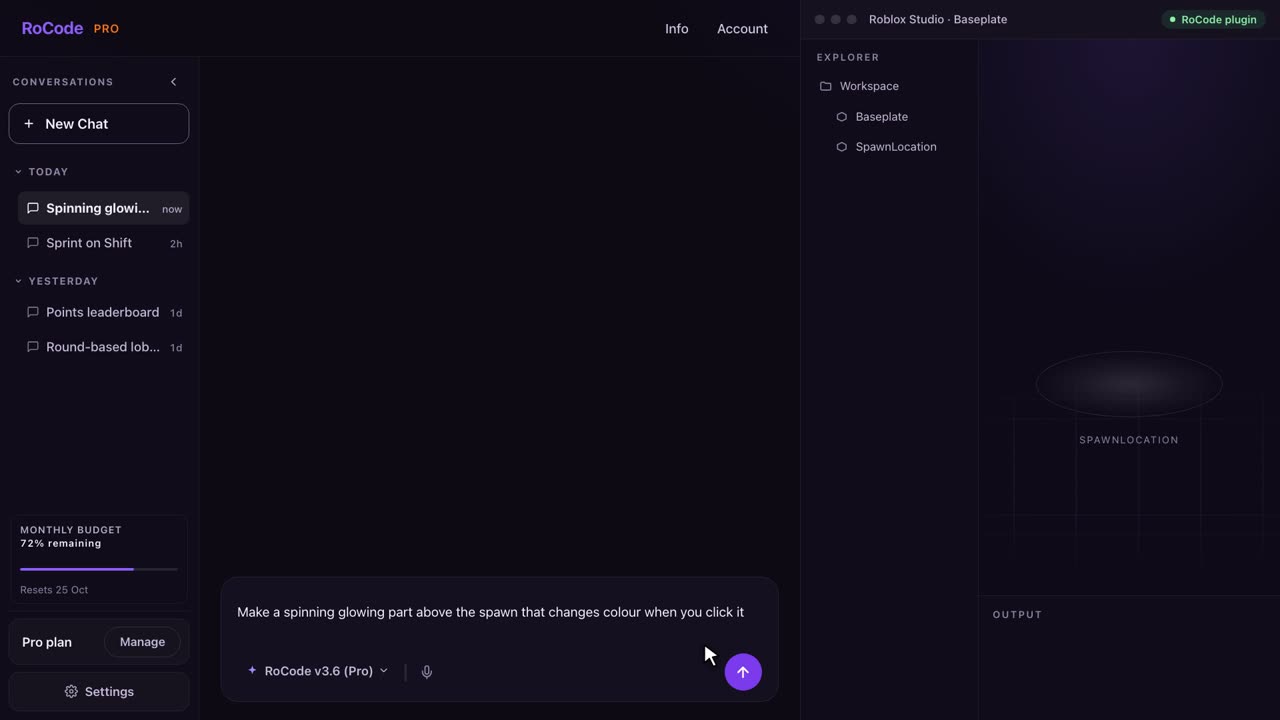
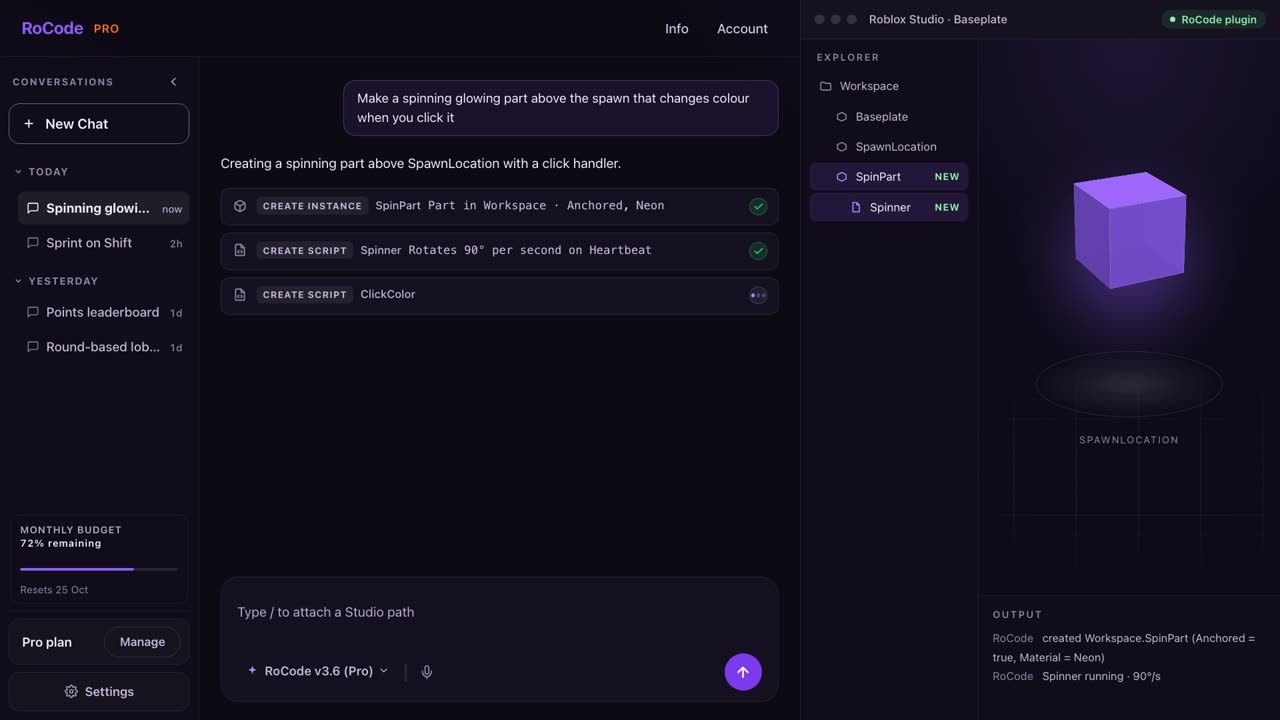
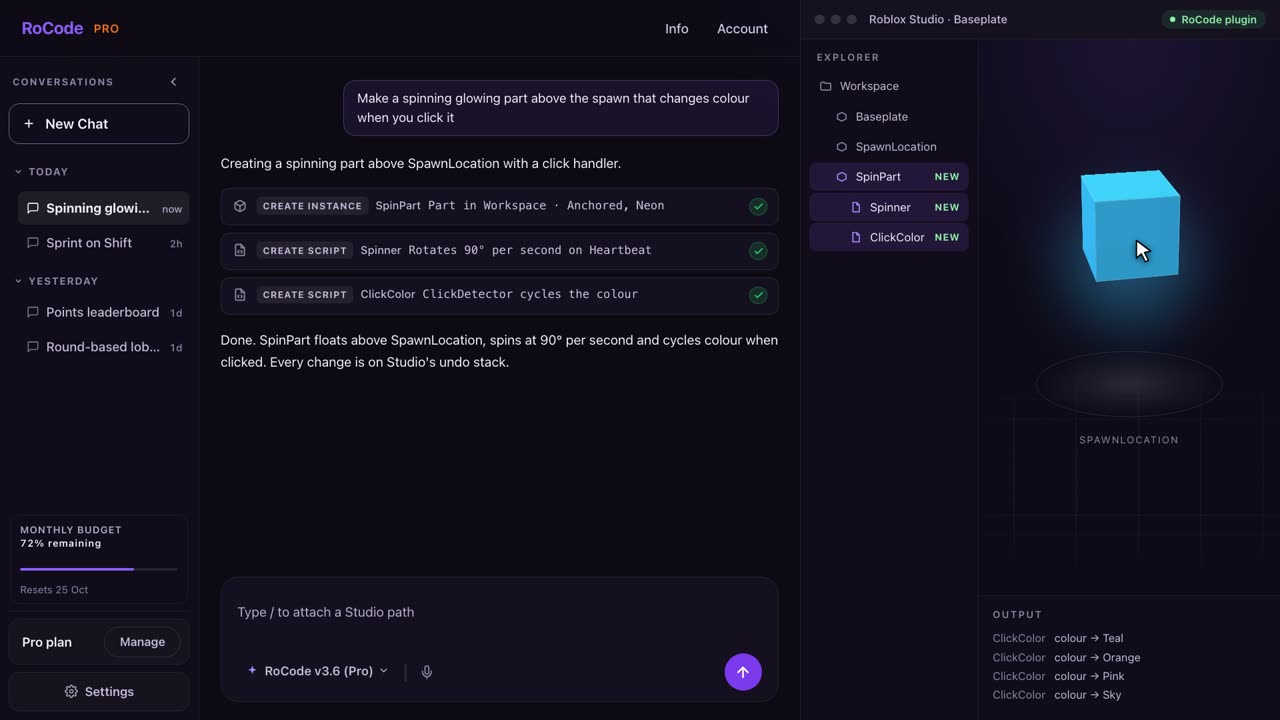
What a RoCode run looks like
Where Roblox Assistant is stronger
- It is already in Studio for every creator, free, with nothing to install or pair.
- It playtests, generates meshes and builds procedural models. Those are real capabilities RoCode does not have.
- Planning Mode gives you an editable plan before anything changes, which suits large multi-script jobs.
- It is first-party, so new Studio features tend to reach it first.
Where RoCode is stronger
- Every action is visible as a step in the chat with the exact path it touched, and every change sits on Studio’s undo stack.
- You choose the model. Three RoCode models are included, and your own OpenRouter key adds Claude or GPT in the same chat.
- The chat is a web page. You can run it on one screen or one machine and let Studio sit on another.
- A daily allowance with a clear number on it: 250,000 tokens a day free, and paid plans measured in tokens a month, so you know what you have left.
- Ready-made building blueprints and UI templates placed in one call.
Pricing
What each one costs
RoCode
$9.99a month for Pro, or free every day
- Free plan: 250,000 tokens a day, no card.
- Pro $9.99 a month (60M tokens), Studio $19.99 (120M), Ultra $29.99 (180M). Annual plans are 30% off.
- Usage packs from 10M to 1B tokens for paid plans, and they never expire.
- Claude and GPT models through your own OpenRouter key, billed by OpenRouter, not by RoCode.
Roblox Assistant
$0included with Studio, daily quotas on some features
- Included with Roblox Studio at no charge.
- Some generation features, such as meshes, carry daily quotas according to Roblox’s announcements and reviews.
- No separate subscription is sold for Assistant as of the date checked.
Which one
Which should you pick?
Use Assistant first. It is free, it is already in Studio, and it plays your game. If it does what you need, you do not need anything else.
Reach for RoCode when you want to choose the model, use your own Claude or GPT key, work from a browser, see every step the agent took with the path it touched, or when you want a known daily and monthly allowance rather than quotas that change. Many people run both: Assistant for planning and playtests, RoCode for the build work.
FAQ
Questions
Is Roblox Assistant free?
It is included with Roblox Studio, with daily quotas on some generation features according to Roblox’s announcements. RoCode’s free plan gives 250,000 tokens a day and paid plans start at $9.99 a month.
Can I use RoCode and Assistant together?
Yes. They are separate tools working on the same place. Both leave their edits in Studio, so Ctrl+Z applies to RoCode’s changes as usual.
Does RoCode use Roblox’s MCP server?
No. RoCode uses its own plugin from the Creator Store, paired with the web chat. Roblox’s MCP server is what tools like Claude Code and Cursor connect to.
Sources
- Roblox newsroom, “Roblox Studio is Going Agentic”, April 2026, and the Developer Forum announcements on Planning Mode, the playtesting agent, the Studio MCP server and external LLM support.
- AIToolTier’s Roblox Assistant review, read 27 September 2026, for the free tier and daily quota details.
RoCode facts come from RoCode’s own plugin and relay code as of the same date. See the full Roblox AI tools comparison.
Try RoCode on your own place.
Free every day, no card required. Install the plugin, describe the feature, and see what lands in Studio.
No card required. Get the Studio plugin (opens in a new tab)