In short
A pet game needs five systems on the server: eggs that roll a pet with known odds, care needs that pay currency and grow the pet through stages, trading that swaps pets in one server-checked step, a house per player that saves furniture, and saving that never loses or copies a pet. If any egg costs Robux, or a currency players can buy with Robux, it is a paid random item: show every outcome with its percentage odds before purchase and check ArePaidRandomItemsRestricted for each player.
- Care tasks are the 30-second loop: a need appears, the player walks to the right station, the pet earns money and growth.
- Trading is what keeps a pet game going long after launch, and it only works if pets cannot be duplicated. Get saving right before you open trading.
- A free egg as a rewarded video prize is not allowed: Roblox says video ad rewards cannot be randomized items.
On this page
What makes a pet game work
The loop in one line: adopt a pet, care for it to earn money and grow it up, spend the money on eggs and furniture, trade for what you lack. Each step gives the player a reason to do the next one, and other players give every step its value.
| Time scale | What the player does | What it gives them |
|---|---|---|
| Every 30 seconds | Answers a need: feed, give water, put to bed, wash, play | Currency and growth points; a reason to move around the map |
| Every few minutes | Watches a pet reach the next stage, buys an egg, places furniture | Visible progress: a bigger pet, a fuller house |
| Every session | Trades, shows off rare pets, visits friends' houses | Status: rare and fully grown pets are what other players notice |
| Every few weeks | Collects the pets from a limited event egg | A deadline that brings lapsed players back |
What separates the pet games people keep playing from the ones abandoned after a month is mostly the economy. When rare pets stay rare, trading has meaning and a fully grown rare pet is a real achievement. When a duplication bug or an over-generous egg floods the server with one pet, its trade value collapses, and so does the reason to play. Plan scarcity on purpose: how many eggs a player can afford per hour, and how long a pet takes to grow up.
The second difference is that the pet feels like it belongs to you. Pets that follow you, react when a need is met and change size with each stage keep players attached. The pet follow guide builds the follow movement; the care and growth loop is below.
The systems you need
| System | What it does | Roblox pieces | Guide |
|---|---|---|---|
| Eggs and adoption | Rolls a pet from weighted odds, takes the price in the same server step | Script, ModuleScript for odds, RemoteFunction | Egg hatching |
| Pet follow | The equipped pet floats or walks after its owner | Model, AlignPosition, AlignOrientation | Pet follow |
| Care needs and growth | Gives the pet needs, pays for each one, grows the pet through stages | ProximityPrompt, CollectionService tags, attributes | This page |
| Inventory | Lists owned pets, equips and unequips them | ScreenGui, ScrollingFrame, RemoteEvent | Inventory |
| Trading | Two players offer pets, both confirm, the server swaps | RemoteEvents, server trade table | Trading |
| Houses | A plot per player with placeable, saved furniture | Model per plot, Workspace:Raycast, data store | This page |
| Saving | Pets, money, furniture, growth | DataStoreService, UpdateAsync, BindToClose | DataStore tutorial |
| Daily rewards | A reward for each day in a row | os.time, data store | Daily rewards |
| Policy checks | Who may buy paid eggs and trade paid pets | PolicyService | This page |
Build plan: from a baseplate to launch
First playable (greybox)
- Block out a small town with grey parts: a spawn plaza, a nursery where eggs are sold, five care stations (food bowl, water bowl, bed, bath, toy) and a row of house plots.
- Add one free starter egg with three pets of different rarity. Use the egg hatching roll on the server, and make the pets coloured blocks.
- Make the equipped pet follow its owner with the pet follow script.
- Add the care loop from the next section: needs every 45 seconds, a reward per need, four growth stages.
- Save money, the pet list and each pet's growth with the DataStore tutorial module. Test leaving and rejoining until nothing is ever lost.
First public test
- Add a second egg that costs in-game currency, and a simple inventory screen to equip pets.
- Give each player a house plot with five pieces of furniture they can place and that save.
- Publish, invite 10 to 20 testers, and watch two numbers: how long until a player can afford the second egg, and whether anyone leaves before their pet grows up once.
Before launch
- Trading, only after saving has survived the test. Log every trade on the server so you can investigate reports.
- Real pet models with animations, a pet that changes size at each stage, and a need bubble over the pet.
- Daily rewards, a first limited event egg, and a game pass or two from the monetization table below.
- The policy check from the eggs section on every paid egg and every trade of paid pets.
The care loop in Luau
Every 45 seconds, each pet that is not already waiting gets a need. Stations are parts tagged PetStation with a Fixes attribute such as Hungry. When the owner holds the prompt at the right station, the server pays Bucks, adds a growth point and works out the stage. Wrong station, nothing happens. Needs and stages live in player attributes, which replicate, so a LocalScript can show a bubble over the pet without asking the server.
-- Script in ServerScriptService named PetCare.
-- Every so often a player's pet wants something. Doing it at the right station
-- pays Bucks and adds growth points; enough points and the pet ages up.
local CollectionService = game:GetService("CollectionService")
local Players = game:GetService("Players")

local NEEDS = { "Hungry", "Thirsty", "Sleepy", "Dirty", "Bored" }
local NEED_EVERY = 45 -- seconds between needs
local NEED_REWARD = 20 -- Bucks for each need the player completes
local STAGES = {
	{ name = "Baby", points = 0 },
	{ name = "Young", points = 6 },
	{ name = "Grown", points = 15 },
	{ name = "Elder", points = 30 },
}

local function stageFor(points: number): string
	local name = STAGES[1].name
	for _, stage in STAGES do
		if points >= stage.points then
			name = stage.name
		end
	end
	return name
end

local function onPlayerAdded(player: Player)
	local stats = Instance.new("Folder")
	stats.Name = "leaderstats"
	local bucks = Instance.new("IntValue")
	bucks.Name = "Bucks"
	bucks.Parent = stats
	stats.Parent = player
	-- Attributes on the player replicate, so a LocalScript can draw the need bubble
	player:SetAttribute("PetPoints", 0)
	player:SetAttribute("PetStage", stageFor(0))
end

-- A station is any part tagged "PetStation" with a "Fixes" attribute, such as "Hungry"
local function setUpStation(station: Instance)
	if not station:IsA("BasePart") then
		return
	end
	local prompt = Instance.new("ProximityPrompt")
	prompt.ActionText = "Care for pet"
	prompt.HoldDuration = 2
	prompt.Parent = station
	prompt.Triggered:Connect(function(player: Player)
		local need = player:GetAttribute("PetNeed")
		if need == nil or need ~= station:GetAttribute("Fixes") then
			return -- the pet does not want this right now
		end
		local stats = player:FindFirstChild("leaderstats")
		local bucks = stats and stats:FindFirstChild("Bucks")
		if bucks and bucks:IsA("IntValue") then
			bucks.Value += NEED_REWARD
		end
		local points = (tonumber(player:GetAttribute("PetPoints")) or 0) + 1
		player:SetAttribute("PetPoints", points)
		player:SetAttribute("PetStage", stageFor(points))
		player:SetAttribute("PetNeed", nil)
	end)
end

Players.PlayerAdded:Connect(onPlayerAdded)
for _, station in CollectionService:GetTagged("PetStation") do
	setUpStation(station)
end
CollectionService:GetInstanceAddedSignal("PetStation"):Connect(setUpStation)

-- Hand out a new need to every pet that is not already waiting for one
while true do
	task.wait(NEED_EVERY)
	for _, player in Players:GetPlayers() do
		if player:GetAttribute("PetNeed") == nil then
			player:SetAttribute("PetNeed", NEEDS[math.random(#NEEDS)])
		end
	end
end- To tag a station, select the part, open the Tags section in its Properties and add
PetStation. Add an attributeFixes(string) with the need it answers. - This version has one pet per player. For several pets, keep a table of pets per player on the server, each with its own need and points, and save it with the pet list.
- Growth points are not saved here. Add them to the player's saved data, or players lose a day of care when they leave.
Tuning matters more than code here. With these numbers a player who answers every need reaches the last stage after 30 needs, at best a bit over 22 minutes. That is a good first session. For later pets, raise the points per stage so growing a rare pet up takes several days of play.
Eggs, odds and Roblox's paid random item rules
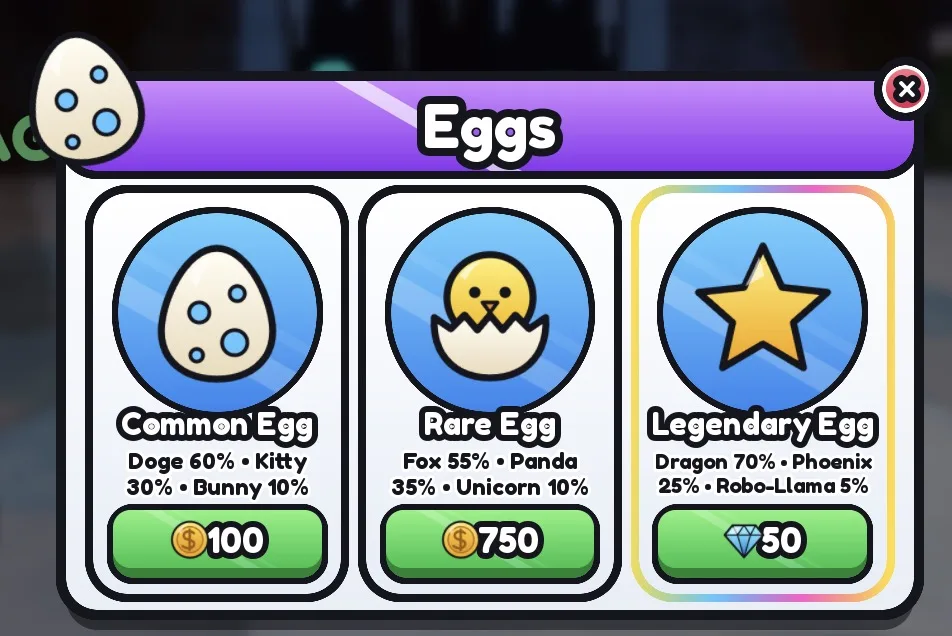
Roblox's paid random items policy names "hatch an egg for a pet" as an example of a paid random item. It applies when the egg costs Robux, or costs a currency that players can buy with Robux. If your game sells currency for Robux, eggs bought with that currency are covered too. What the policy asks for:
- Show every possible outcome and its odds before purchase, as percentages. The percentages of all outcomes must add up to exactly 100%. Long decimals may be rounded if you add a note that rounded odds may not total 100%.
- If the list does not fit in the 3D view, a clickable pop-up is allowed, opened by a button with a word such as "Info" or "Details". A bare (i) symbol is not enough.
- Luck boosts count too. A paid potion or pass that improves the odds must explain its effect in numbers before purchase, and the odds shown must update while it is active.
- If a player can only get one copy of an outcome, the odds shown to that player must update to the remaining outcomes.
- Combining two eggs for a better chance at a rare result is listed as a paid random item as well.
The policy also says that random rewards for an action that involves no Robux or in-game currency, such as opening a chest with a key found in the world, need no odds. A starter egg given for free is that kind of reward. Showing odds on every egg anyway is simpler and players expect it.
Check each player's policy
PolicyService:GetPolicyInfoForPlayerAsync returns ArePaidRandomItemsRestricted. When it is true, that player must not buy paid random items, with Robux or with currency bought with Robux. The script below reads it once per player and stores it as an attribute, so the server code that sells eggs can check it.
-- Script in ServerScriptService named EggPolicy.
-- Reads each player's policy once, so the egg shop and the trade menu can check it.
local PolicyService = game:GetService("PolicyService")
local Players = game:GetService("Players")

local function readPolicy(player: Player)
	local ok, info = pcall(function()
		return PolicyService:GetPolicyInfoForPlayerAsync(player)
	end)
	-- If the call fails, treat the player as restricted until it succeeds
	local restricted = true
	local tradingAllowed = false
	if ok and type(info) == "table" then
		restricted = info.ArePaidRandomItemsRestricted == true
		tradingAllowed = info.IsPaidItemTradingAllowed == true
	end
	player:SetAttribute("PaidEggsRestricted", restricted)
	player:SetAttribute("PaidTradingAllowed", tradingAllowed)
end

Players.PlayerAdded:Connect(readPolicy)
for _, player in Players:GetPlayers() do
	task.spawn(readPolicy, player)
end

-- In the server code that sells an egg for Robux, or for a currency players can buy:
-- if player:GetAttribute("PaidEggsRestricted") ~= false then
--     refuse, and offer the earnable egg or a direct purchase instead
-- end
For a restricted player, Roblox lists the allowed treatments: an earnable path to the egg (for example eggs given at gameplay milestones), outcomes in a fixed order disclosed before purchase, the pet sold directly at a price based on its expected value, hiding the paid egg, blocking the purchase with a message, or keeping the player out of the area with paid eggs. A simple combination for a pet game is earnable eggs plus a message on the paid ones.
Trading and houses
The trading guide builds requests, offers and a ready check with the swap on the server. Three things are specific to a pet game:
- Duplication is the bug that ends pet games. If a player can trade a pet away and then rejoin a server that loaded an older save, the pet exists twice. Save both players right after a trade, and use session locking as described in the DataStore tutorial.
- Paid pets and policy.
IsPaidItemTradingAllowedfrom the same policy call says whether a player may trade items bought with Robux or with Robux-bought currency, including pets from paid eggs. When it is false, do not let that player trade those pets. Mark each pet with how it was obtained when it is created, so the server can tell. - Show both sides clearly. Rarity, stage and any special variant must be visible in the trade window, and a short countdown after any change to an offer stops last-second swaps.
Houses give players a reason to stay when their pets are grown. Give each player a plot when they join. Save furniture as a list of item ids with positions relative to the plot's origin, not world positions, because the player will get a different plot in the next server. Let the client preview placement with a raycast, then have the server check the item is owned and inside the plot bounds before placing it.
Monetization that fits a pet game
| Product | Roblox feature | Fits the genre? |
|---|---|---|
| Currency packs | Developer product (bought many times) | Yes. Remember it makes eggs bought with that currency paid random items. |
| Premium eggs | Developer product, or currency | Yes, with odds shown, the luck rules and the policy check above. |
| Extra pet slots, faster growth, bigger house | Pass (one-time) | Yes. Convenience and space, not power. |
| A pet sold directly | Pass or developer product | Yes. No randomness, no odds needed, and it is one of the treatments for restricted players. |
| Monthly perks | Subscription | Can fit: a daily item and a cosmetic. Subscription rules say benefits must last the full term. |
| Private servers | Paid private servers | Yes. Players use them to trade and play with friends. |
| Ad for a bonus | Rewarded video ad | Only with a fixed developer product reward, such as currency. Never an egg: ad rewards cannot be random. |
Pay-to-win in a pet game looks different from a combat game. The trap is selling luck so strongly that paying players flood the economy with rare pets, which destroys trade value for everyone, paying players included. Keep the rarest pets earnable and scarce, and sell speed, space and looks. One older income source is gone: engagement-based payouts for Premium playtime were replaced by the Creator Rewards program in July 2025.
What brings players back
- Growth that takes days. A rare pet that needs several sessions of care to grow up is a reason to log in tomorrow.
- Daily rewards with a streak, paid in currency or care items.
- Limited event eggs. An egg available for a few weeks, with its own pets, is the genre's main update rhythm. When it ends, those pets only come from trading.
- A collection index. A screen that shows every pet, owned or not, turns a few pets into a goal.
- Friends and houses. Visiting each other's houses and trading in a busy plaza keep the game social.
Build it with RoCode
RoCode is an AI agent that builds in the Roblox Studio place you have open: you describe what you want in a web chat, and its free Studio plugin creates the scripts, parts and UI. For a pet game it can build the care loop, an egg with odds and a policy check, and screens such as egg hatching, inventory, trading and daily rewards from its UI kits. A pet game is built over several prompts, one working system at a time. It cannot make pet meshes or animations, so the pets start as simple shapes or free Creator Store models it finds by searching with your words, until you add your own.
Make the first playable of a pet game: a free starter egg that gives one of three pets with odds shown, the pet follows me, every 45 seconds it gets a need (hungry, thirsty, sleepy, dirty, bored) that I fix at a station for Bucks and growth points, four growth stages, and save pets and Bucks.
- Writes the server scripts for eggs, needs, growth and saving, and builds the care stations in your place
- Can add UI kit screens such as egg hatching, inventory, daily rewards and trading
- Can run a test robot that walks to stations and presses prompts, and report PASS or FAIL
- Takes screenshots in edit mode to check how the town and stations look
You still decide the odds, playtest the economy with real people, and create passes and products in Creator Hub. How RoCode builds a game in rounds.
Questions
How do I make a game like Adopt Me in Roblox Studio?
Start with one free egg, a pet that follows you and a care loop that pays currency and grows the pet. Add saving next, then a paid egg, houses and finally trading. Use your own pets, names and art.
Do I have to show egg odds?
Yes, if the egg costs Robux or a currency players can buy with Robux. Roblox requires every outcome with its percentage odds, adding up to 100%, before purchase. Showing odds on free eggs is optional but expected.
Can players get an egg for watching an ad?
No. Roblox's rewarded video rules say the reward must be a developer product and cannot be a randomized item. Give a fixed amount of currency instead.
How do I stop pets being duplicated in trades?
Do the swap in one server step, save both players straight after, and use session locking so a player cannot load an older save in another server. The DataStore and trading guides cover both.
How long does a pet game take to build?
The greybox (one egg, care, growth and saving) is the quick part. Trading, houses, real pet models and a first event take far longer, and the economy needs several rounds of testing with real players before launch.
Sources and further reading
- Roblox Creator Docs: Paid random items policy. eggs as paid random items, odds disclosure, restricted players and paid item trading
- Roblox Creator Docs: PolicyService. GetPolicyInfoForPlayerAsync fields
- Roblox Creator Docs: Rewarded video ads. rewards must be developer products and cannot be random
- Roblox Creator Docs: Passes
- Roblox Creator Docs: Developer products
- Roblox Creator Docs: Subscriptions
- Roblox Creator Docs: Private servers
- Roblox Creator Docs: Engagement-based payouts. replaced by Creator Rewards
- Roblox Creator Docs: ProximityPrompt
- RoCode guide: Egg hatching
- RoCode guide: Trading system
How the code was checked: every script on this page passes Luau's strict type checker against Roblox's API definitions (luau-lsp, 26 October 2026). A type check catches misspelt APIs and wrong types, not game logic, so playtest in Studio before you publish.