In short
To make an RPG in Roblox Studio, build one starting zone with a town, a few enemy types and a boss, give players a weapon and a progression system (XP, levels and stats saved in a data store), add quests with an objective, a quantity and a reward, and gate the next zone behind a level. Keep enemies, items and quests in data tables so new content is mostly data, and grow the world one zone per update.
- Roblox's own core loop example is an action RPG: explore, fight, then upgrade so you explore and fight better.
- Credit every player who damaged an enemy, not only the one who landed the last hit.
- Plan the content treadmill before launch: a new zone should be a building job plus data, not new systems.
On this page
What makes an RPG work
The core loop in one line: explore, fight, collect, grow stronger, reach the next place you could not handle before. Roblox's core loop page uses an action RPG as its example: exploration from minute to minute, fighting as the most repeated action, and an upgrade tree as the progression engine that sends the player back out stronger.
| How often | What happens | What it needs from you |
|---|---|---|
| Every few seconds | A hit, a dodge, a spell, a pickup | Combat that feels responsive, with clear hits and enemy reactions |
| Every few minutes | A quest step done, a level up, a new item | XP and drops tuned so something good happens often early on |
| Every session | A boss beaten, a new zone opened, a gear upgrade | Zones gated by level, and bosses with rewards worth the fight |
| Every update | A new zone, a higher level cap, new gear | Data-driven enemies, items and quests |
- A world that rewards walking off the path. A chest behind a waterfall, a rare enemy in a cave. Exploration is the minute to minute action, so the world must pay for curiosity.
- Combat with a little depth. Two or three abilities with cooldowns, enemies with telegraphed attacks, and a reason to dodge.
- A progression curve players can feel. Levels that come quickly at first and slow later, and gear that visibly changes damage.
- Goals at every distance. The next quest step, the next level, the next zone, the boss everyone talks about.
- Playing together. Fighting a boss with strangers who all get rewarded turns a server into a party.
If you want the fighting without the world, the battlegrounds guide covers arena combat, and the zombie survival guide covers waves of enemies.
The systems you need
| System | What it does | Roblox pieces | Guide |
|---|---|---|---|
| Combat | Melee hits, ranged attacks, abilities with cooldowns | Tool, server hitboxes, RemoteEvent | Sword, Combat system |
| Enemies | Wander, chase, attack, respawn | Humanoid, PathfindingService, CollectionService tags | NPC pathfinding |
| XP and levels | Credit by damage, level curve, stat points | A ModuleScript, player attributes | This page |
| Health and XP bars | Show health, level and progress | ScreenGui | Health bar GUI |
| Inventory and gear | Weapons, armour, potions, equipping | Tools, data tables, a grid GUI | Inventory |
| Quests | Objective, quantity, reward, chains | NPC prompts, a quest log GUI | NPC dialogue |
| Zones | Areas gated by level, fast travel | Gate parts checked on the server, teleports | Teleporter |
| Shops | Buy gear and potions with gold | A shop GUI, server-checked purchases | Shop GUI |
| Saving | Level, XP, gold, gear, quest progress | DataStoreService | Data stores |
| World | Terrain, lighting, day and night | Terrain, Lighting | Terrain generator, Day and night |
Build plan: from a baseplate to launch
First playable: one zone
- Block out a starting zone. A small town with a quest giver and a shop, a field with weak enemies, a forest with stronger ones, and a boss arena at the far end. Greybox parts are fine.
- Give the player a weapon. Start from the sword or combat guide, and route all damage through
Progression.damagebelow. - Make two enemy types and a boss. Use the pathfinding guide for chasing. Tag each enemy's
HumanoidwithEnemyand give it anXPattribute. Respawn enemies a short time after they die. - Add the progression module and a level and XP bar on screen. Kill enemies, level up, check the bar fills more slowly at higher levels.
- Add three quests from the town NPC: kill 5 field enemies, collect 3 forest items, defeat the boss.
- Save level, XP, gold, gear and quest progress.
First public test
One zone, three quests, a boss, saving. That is about one session of content, which is what you want: enough to see whether players enjoy the combat and where they stop. Watch which quest step loses the most players, how long the boss takes, and whether players who fight it together all leave happy.
What to add for launch
- A second zone gated by level, with a new enemy family and a new boss.
- Gear tiers with visible stat differences, potions, and a few abilities with cooldowns.
- Daily quests, achievements as badges, and a party system so friends share quest credit.
- For a large map, StreamingEnabled on
Workspace(a property set in Studio, not from scripts), so players only load what is near them. Write client scripts that wait for parts withWaitForChildinstead of assuming the whole map exists. - The Maturity and Compliance Questionnaire, answered for your most intense combat.
The defining mechanic: XP, levels and shared credit
Two problems show up in every multiplayer RPG. First, if only the last hit gets XP, players steal kills and stop helping each other. Second, if every level costs the same XP, levels either come too fast at the end or too slowly at the start. This module solves both: it records how much damage each player dealt to each enemy, splits the enemy's XP by that share when it dies, and uses a curve where each level costs more than the last.
-- ModuleScript in ServerScriptService named Progression.
-- Damage credit, XP split by damage dealt, and level ups on a curve. Only server scripts require it.
local CollectionService = game:GetService("CollectionService")
local Players = game:GetService("Players")

local Progression = {}

local MAX_LEVEL = 50
local damageBy: { [Humanoid]: { [Player]: number } } = {}

-- XP needed to go from this level to the next: grows faster than linear, so levels slow down
function Progression.xpToNext(level: number): number
	return math.floor(100 * level ^ 1.5)
end

function Progression.giveXP(player: Player, amount: number)
	local level = tonumber(player:GetAttribute("Level")) or 1
	local xp = (tonumber(player:GetAttribute("XP")) or 0) + amount
	while level < MAX_LEVEL and xp >= Progression.xpToNext(level) do
		xp -= Progression.xpToNext(level)
		level += 1
	end
	player:SetAttribute("Level", level)
	player:SetAttribute("XP", xp)
end

-- Your weapon and spell scripts call this instead of Humanoid:TakeDamage
function Progression.damage(player: Player, enemy: Humanoid, amount: number)
	if enemy.Health <= 0 then
		return
	end
	local dealt = math.min(amount, enemy.Health)
	local byPlayer: { [Player]: number } = damageBy[enemy] or {}
	byPlayer[player] = (byPlayer[player] or 0) + dealt
	damageBy[enemy] = byPlayer
	enemy:TakeDamage(amount)
end

-- Enemies: a Humanoid tagged "Enemy" with an XP attribute. Everyone who hit it gets a share.
local function watch(enemy: Instance)
	if not enemy:IsA("Humanoid") then
		return
	end
	enemy.Died:Connect(function()
		local byPlayer: { [Player]: number } = damageBy[enemy] or {}
		damageBy[enemy] = nil
		local reward = tonumber(enemy:GetAttribute("XP")) or 10
		for player, dealt in byPlayer do
			if player.Parent == Players then
				Progression.giveXP(player, math.ceil(reward * dealt / enemy.MaxHealth))
			end
		end
	end)
end

CollectionService:GetInstanceAddedSignal("Enemy"):Connect(watch)
for _, enemy in CollectionService:GetTagged("Enemy") do
	watch(enemy)
end

return Progression
Your weapon scripts require the module and call Progression.damage(player, enemyHumanoid, amount) after their own server-side hit check. Tag the enemy's Humanoid (not the model) with Enemy using CollectionService:AddTag or Studio's tag tools, and set an XP attribute on it. Level and XP live in player attributes, which the client can read for the XP bar but cannot change on the server.
| Level | XP to next level |
|---|---|
| 1 | 100 |
| 5 | 1,118 |
| 10 | 3,162 |
| 25 | 12,500 |
| 49 | 34,300 |
Tune enemy XP against this table rather than the other way round. If a field enemy gives 20 XP, level 2 takes five kills and reaching level 10 takes about 550 in total, which tells you level 10 players should be fighting tougher enemies in the next zone. Raise MAX_LEVEL when you add a zone.
The hard part: content that keeps up
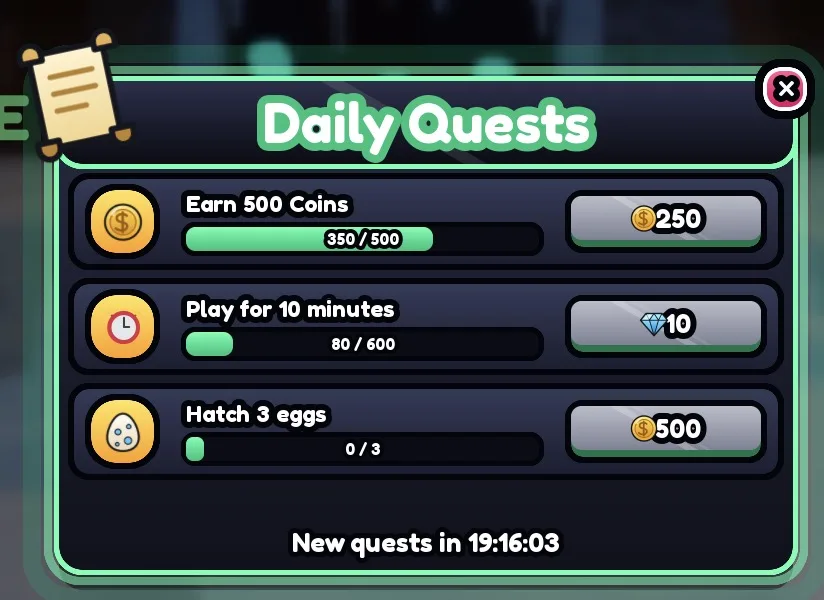
Players finish a zone much faster than you can build one. Roblox's quest design page breaks a quest into three parts: an objective (collect, defeat, travel), a quantity (5 wolves, 10 herbs) and a reward (XP, gold, an item). Quests can chain into one another, and two common types are long achievements, which Roblox calls badges, and short dailies that refresh every 24 hours.
That structure is also how you keep up with players. Write quests, enemies and items as data in ModuleScript tables, with one generic quest tracker that counts kills by enemy type, pickups by item and visits by place. Then a new zone needs a build, a list of enemies with stats, a list of drops and a list of quests, and no new code.
- Enemies: name, health, damage, speed, XP, drop table, zone.
- Items: name, slot, stats, price, rarity.
- Quests: giver, objective type, target, quantity, reward, next quest in the chain.
- Zones: name, minimum level, spawn point, enemy list.
Free drops from enemies and bosses can be random without any special rules: Roblox's paid random items policy says rewards earned without paying Robux, or currency bought with Robux, do not need odds disclosed. That changes the moment a chest, a re-roll or a luck boost is sold, as the next section explains.
Monetization that fits an RPG
Most RPG play is against enemies, not other players, so players accept more convenience purchases than in a competitive genre. The line moves if you have PvP: anything that raises damage or health decides fights there, and should stay out of PvP or out of the shop.
| Roblox feature | Fits well | Watch out for |
|---|---|---|
| Game pass (bought once) | Extra inventory space, a mount, a cosmetic armour look, faster travel, a permanent XP boost | Pass-only gear that is stronger than anything players can earn |
| Developer product (bought again) | Gold packs, an XP potion for an hour, a revive at the spot | Grind tuned so the potion feels required |
| Developer product: loot chest | A chest with random gear | A paid random item: every outcome and its odds before purchase, plus PolicyService treatments |
| Developer product: enhancement | An upgrade stone with a chance to work | Also a paid random item in Roblox's list ("upgrade spell with some chance of working") |
| Private server (free or a monthly Robux fee) | Grinding and questing with friends | Nothing special |
| Subscription (monthly) | A daily gold bonus, a monthly cosmetic | Benefits must last the full term |
Roblox's private servers page lists gathering in-game resources as one reason players want them, which fits an RPG well. For chests, enhancement items and luck boosts sold for Robux, follow the paid random item rules in the RNG guide: odds as percentages adding up to 100%, numbers for any luck change, and a PolicyService check for each player.
If you reward Premium members, Roblox advises against giving them a tactical advantage, such as weapons non-members cannot compete against; cosmetics are the safe choice. Grant developer products through MarketplaceService.ProcessReceipt. Roblox's Creator Rewards program replaced engagement-based payouts on 24 July 2025.
What brings adventurers back
- Daily quests. Short tasks with modest rewards that refresh every day, as Roblox's quest design page describes. They give a reason to log in even when the main quest is stuck.
- Bosses on a timer. A world boss that appears every hour gathers the server in one place and gives strangers a reason to team up.
- Rare drops. A boss with a small chance of a special weapon keeps players farming it, and earned drops need no odds disclosure.
- Badges. Achievements for beating each boss, finding hidden places or reaching the level cap.
- Parties. Shared quest credit and XP for friends nearby, which the damage split above already supports.
- Zone updates. One new zone, a higher level cap and a new boss per update, built from data tables.
A daily reward streak and codes at each update round it off.
Build an RPG with RoCode
RoCode is an independent AI agent for Roblox Studio. You describe the game in a web chat, and its free Studio plugin writes the Luau and creates the scripts, parts and UI in the place you have open. An RPG is the clearest case for building in rounds: one zone and its systems first, then each new zone.
Make the first playable zone of an RPG: a small greybox town with a quest giver and a shop, a field with weak enemies and a forest with stronger ones that chase players, a sword whose hits are checked on the server, XP split between everyone who damaged an enemy, levels on a curve, three quests, health and XP bars, and saving of level, XP and gold.
- Writes the combat, enemy, progression and quest scripts on the server
- Can add ready-made screens such as health and XP bars, an ability bar, quests, NPC dialogue, an inventory and a shop
- Can build themed world islands such as volcano, desert canyon, jungle or snow in one call, for new zones
- Builds the game a working part at a time, and can run a test robot that walks, equips tools and reports PASS or FAIL
It cannot make custom meshes, textures or animations from scratch, sculpt terrain by hand, or publish the game, and it cannot tell you whether the combat is fun. Free credits every day, no card needed. How RoCode builds a game.
Questions
How long does it take to make an RPG on Roblox?
Longer than most genres, because of the content. A single zone with combat, enemies, three quests and saving is a realistic first goal; each later zone is mostly building and data if your systems are data-driven.
How do I make a level system in Roblox?
Store Level and XP for each player on the server, add XP when they defeat enemies or finish quests, and level up while XP is above a cost that grows with level, such as 100 * level ^ 1.5. Save both in a data store.
Who should get XP when several players fight one enemy?
Everyone who hit it, in proportion to the damage they dealt. The progression module above records damage per player and splits the XP when the enemy dies, so nobody loses out to a last hit.
Can I make an RPG without scripting?
You can build the world without scripts, but combat, enemies, XP, quests and saving all need them. Use the scripts here and in the linked guides, or describe each system to an AI tool such as RoCode and test what it builds.
Do I need StreamingEnabled for an open world?
For a large map it helps, because players only load the area around them. It is a property on Workspace set in Studio, and client scripts then need to wait for parts that may not have streamed in yet.
Do random drops need odds shown?
Not when they are earned by playing. Roblox requires odds for random items bought with Robux, or with currency bought with Robux, such as a paid loot chest.
Sources and further reading
- Roblox Creator Docs: Core loops. the action RPG example
- Roblox Creator Docs: Introduction to quest design. objective, quantity, reward; achievements and dailies
- Roblox Creator Docs: Workspace. StreamingEnabled
- Roblox Creator Docs: CollectionService
- Roblox Creator Docs: Humanoid. TakeDamage and Died
- Roblox Creator Docs: Paid random items policy guidelines
- Roblox Creator Docs: Private servers
- Roblox Creator Docs: Engagement-based payouts. deprecated for Creator Rewards; Premium best practices
- RoCode guide: Combat system
- RoCode guide: NPC pathfinding
How the code was checked: every script on this page passes Luau's strict type checker against Roblox's API definitions (luau-lsp, 26 October 2026). A type check catches misspelt APIs and wrong types, not game logic, so playtest in Studio before you publish.