Free gallery, no login
Free Roblox UI kits
Ten ready-made game screens in the pet simulator style, each in 5 themes, with the scripts that make them work. Pick a theme, look at every screen, then have RoCode add the ones you want to the Studio place you have open.
Sign up free, then tell RoCode “add a neon shop”. Free credits every day, no card.
The screens
10 Roblox UI screens, 5 themes
Every screen has the same layout in every theme; the colours, outlines, corners and font change. Candy is the theme you get when you do not name one.
-
 Studio screenshot
HUD
Coins and Gems counters on the left, under Roblox’s chat window, that follow your leaderstats, and a side menu of big tiles. The open buttons of the other screens join this menu by themselves.
StarterGui.SimHudServerScriptService.SimCurrencyServer
To change: the currency names in CURRENCIES (HudController). SimCurrencyServer makes and saves Coins and Gems only when your own scripts do not.
-
 Studio screenshot
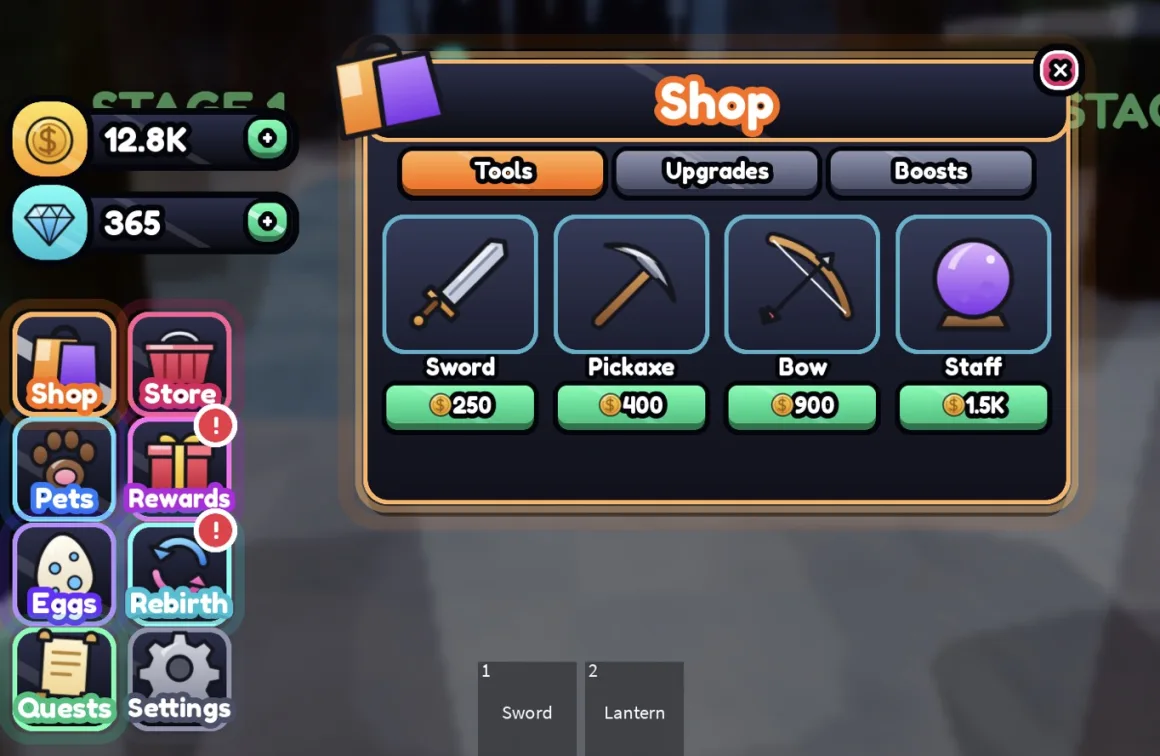
Item shop
Tabs and item cards with Buy, Owned and Equip. Its server script checks the price, takes the coins, saves what each player owns and gives real Tools, upgrades and timed boosts.
StarterGui.SimShopServerScriptService.SimShopServer
To change: the items (name, icon, price, currency, tab, what it gives) in ITEMS in SimShopServer.
-
 Studio screenshot
Store: game passes and codes
Full-width game pass rows, each in its own colour with a round icon, its perks and a green Robux price button, then a codes box that redeems codes on the server.
StarterGui.SimStoreServerScriptService.SimCodesServer
To change: your game pass ids and prices in PASSES (StoreController), and codes with their rewards in CODES (SimCodesServer).
-
 Studio screenshot
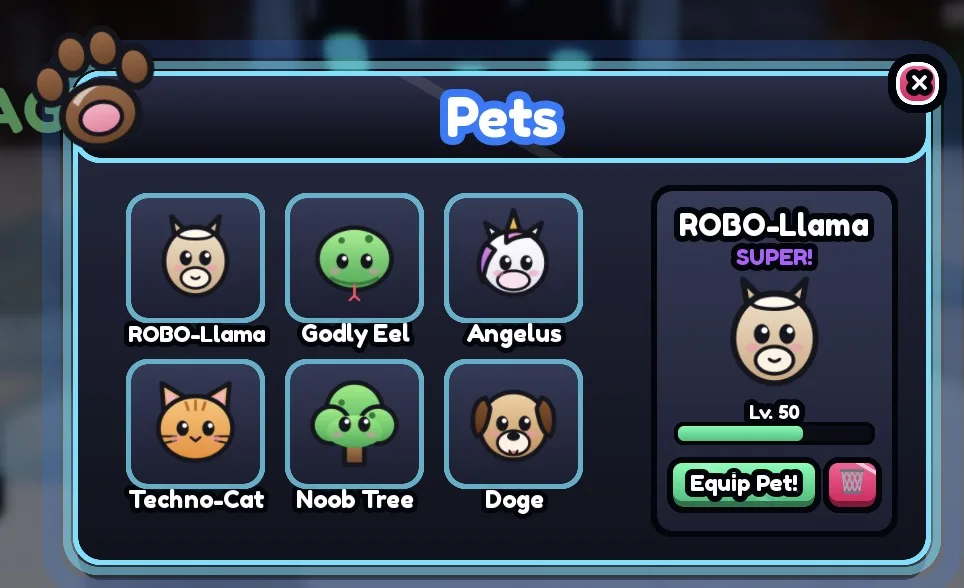
Pet inventory
A grid of pets on the left and the chosen pet on the right with its rarity, level bar, Equip and delete. It lists the pets the egg screen saves.
StarterGui.SimInventory
To change: the PETS list in InventoryController. Its Equipped and Deleted events tell your server scripts what a player picked.
-
 Studio screenshot
Egg hatching
Egg cards with pet odds and a price, and a full-screen hatch: the egg shakes harder, flashes, and the pet pops out on spinning rays in its rarity colour.
StarterGui.SimEggsServerScriptService.SimEggServer
To change: eggs, prices and pet odds in EGGS in SimEggServer, which rolls the pet and saves it.
-
 Studio screenshot
Daily rewards
A 7-day streak with today’s card glowing, claimed days ticked, a Claim button and a countdown. It opens by itself when a reward is ready.
StarterGui.SimDailyRewardsServerScriptService.SimDailyRewardsServer
To change: the 7 rewards in REWARDS in SimDailyRewardsServer, which keeps the streak in a data store.
-
 Studio screenshot
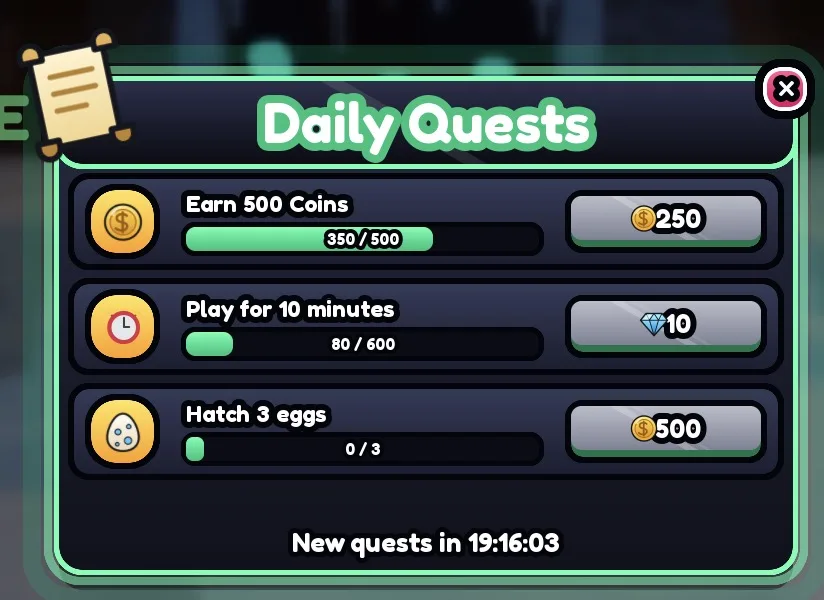
Daily quests
Three quests with progress bars, rewards and Claim, and a timer to the next reset. Its server script tracks coins earned, minutes played and eggs hatched by itself.
StarterGui.SimQuestsServerScriptService.SimQuestsServer
To change: QUESTS in SimQuestsServer. Your own scripts can count anything else with Progress:Fire(player, id, amount).
-
 Studio screenshot
Rebirth
The current and next coin multiplier, the cost with a progress bar, and a Rebirth button. A rebirth resets Coins and raises the multiplier.
StarterGui.SimRebirthServerScriptService.SimRebirthServer
To change: the price in BASE_COST. Your coin rewards read the player attribute CoinMultiplier.
-
 Studio screenshot
Settings
Switches that really work and are saved per player: music, sound effects, low graphics and show other players.
StarterGui.SimSettingsServerScriptService.SimSettingsServer
To know: the music switch mutes Sounds named or tagged Music.
-
 Studio screenshot
Loading screen
Replaces Roblox’s default loading screen with your game’s name, a bouncing icon, a progress bar of the assets left to load, rotating tips and a Skip button.
ReplicatedFirst.SimLoading
To change: the TIPS list in the script. The game name comes from Roblox.
Screenshots: Roblox Studio playtests on 24 October 2026, every screen in every theme.
The set is the HUD, item shop, egg hatching, pet inventory and daily rewards. Ask for any other screens in the same message.
The themes
Which theme fits your game
Candy
- Bright and cartoony, white windows
- Thick black outlines and glossy shine
- The default: you get it when you name no theme
Neon
- Dark windows with glowing edges
- For sci-fi, night and gamer games
- Ask for “neon” or “dark”
Gold, blocky, pastel
- Gold: cream and gold, for VIP and luxury
- Blocky: classic Roblox, square corners, no shine
- Pastel: soft colours for cute and cozy games
How it works
From this page to your game
RoCode is an AI agent for Roblox Studio: a web chat and a free Studio plugin that builds in the place you have open.
Sign up and connect Studio
Make a free account, add the RoCode plugin in Studio and connect it with one click.
Ask for a screen
Write “add a neon shop” or “add pastel daily rewards”. RoCode inserts the screen and its server script in one step, and the chat can be in your language.
Make it yours
Ask for your own items, prices and rewards. After a build, the test robot can play the game in Studio, click the buttons and report PASS or FAIL.
Free game templates
Free Roblox game templates to put them in
Free step-by-step guides for four kinds of game, each with a type-checked starter script. Copy the script into Studio, or have RoCode build the game with the UI kits on top.
-
Obby
Numbered checkpoints, a Stage stat, no skipping stages, respawn at the last one reached, and saving. One server Script.
Pairs with: HUD, settings, loading screen
-
Tycoon
A claim pad, droppers, a conveyor, a collector that pays Cash, and upgrade buttons checked on the server.
Pairs with: HUD, store, daily rewards
-
Simulator
Clicks earn coins under a server rate limit, upgrades and rebirths raise them, and progress saves.
Pairs with: HUD, egg hatching, pet inventory, rebirth
-
Round-based minigame
Intermission with a player minimum, random maps, teleports, a timer on every screen and a Win for each survivor.
Pairs with: HUD, item shop, daily quests
FAQ
Questions
Are these Roblox UI kits free?
Yes. You can look at all of them here with no login, and you can add them to your game on RoCode’s free plan, which gives 1 credit a day and needs no card. Adding a screen is part of a RoCode build, so it uses some of those credits.
Can I download the UI kits as a file?
No. There is no .rbxm to download: RoCode puts each screen straight into the place you have open in Roblox Studio, as a ScreenGui in StarterGui (the loading screen goes in ReplicatedFirst) and, for most screens, a server Script in ServerScriptService. After that they are ordinary objects in your place that you can edit or delete.
Do the buttons and screens actually work?
Yes. Each screen comes with the scripts it needs. The item shop’s server script checks prices, takes the currency and saves what each player owns; the egg screen rolls and saves pets; daily rewards keep the streak in a data store; settings save per player. The pet inventory has no server script of its own: it lists the pets the egg screen saves and fires Equipped and Deleted events for your scripts.
How do I change the items, prices and rewards?
Each screen keeps them in one named list at the top of its script: ITEMS for the shop, EGGS for eggs, PASSES and CODES for the store, REWARDS for daily rewards, QUESTS for quests, BASE_COST for rebirth and TIPS for the loading screen. Edit the list yourself, or ask RoCode, for example “make the Sword cost 300 coins”.
Can I switch to another theme later?
Yes. Ask RoCode for the new theme. It moves the old screen to ServerStorage, so a copy stays, and inserts the screen again in the new theme. The server scripts work with every theme and stay as they are.
What do I need to add them?
Roblox Studio, the free RoCode Studio plugin (version 3.9.14 or newer) and a RoCode account in a desktop browser. The chat runs on a computer, not on a phone.
Will my game be tested after the UI is added?
It can be. After a build, RoCode’s test robot can play your game in Studio: it walks, touches parts, presses keys, clicks on-screen buttons and equips tools, then reports each check as PASS or FAIL. RoCode decides when to run one, so not every build gets a test.
More free tools
Other free tools for Roblox creators
- Game idea generatorA game idea with its core loop, features and the first prompts to build it.Get an idea
- DevEx calculatorRobux to US dollars at Roblox’s published DevEx rates.Convert Robux
- Robux tax calculatorWhat you keep from a game pass or item sale after Roblox’s fee.Work it out
- Luau playgroundRun Luau, the language Roblox games are scripted in, in your browser.Run some Luau
- AI game makerRoCode builds your game in your own Studio place, one feature per prompt.See how it works
- Thumbnail size checkerCheck a thumbnail or game icon against Roblox’s sizes, in your browser.Check an image
Sources and dates
- The screens, their scripts, the named lists and the five themes: RoCode’s UI kit source (the insert_ui tool and its kit files), read 23 October 2026.
- Screenshots: RoCode’s UI kits inserted into a test place and played in Roblox Studio on 24 October 2026. The coins, items, pets and prices in them are the kits’ examples.
- Plugin versions: RoCode docs and changelog.
RoCode is an independent product, not made by Roblox. Pet and item names in the screenshots are placeholder examples that ship with the kits; replace them with your own.
Add these screens to your game free.
Sign up, connect the RoCode plugin in Roblox Studio, and tell RoCode “add a neon shop”. It builds in the place you have open. Free credits every day, no card.
Needs Roblox Studio and a desktop browser. RoCode is independent, not made by Roblox.